Blog
Out-of-band thinking: The networks in an Enterprise Enclosure
Introduction

A multi-node system is significantly more complex than one that has only a single node. Not only in terms of its performance, thermals, or power, but also in how the nodes should communicate with each other and with administrators. Traditional enterprise servers provide users with sophisticated and integrated solutions, but they are expensive and locked down. On the other end of the spectrum, external switches, KVM devices, and open source management tools can be used to manage discrete systems such as those used in home servers. But these add clutter and cannot be expected to work seamlessly.
We created OpenSFF to provide a middle ground between those extremes. To help achieve this, we adopted the general design of blade servers, including their network architecture. Thus, Enterprise Enclosures are required to have two internal isolated networks: the Node Network (NN) and the Private Enclosure Network (PEN).
The NN is used for workloads and communications, while the PEN is strictly for node management. The former is accessed through network ports exposed on the Enclosure, while the latter is accessed only through the Management Module.
Let us take a closer look at the purpose of these networks, how the Management Module completes the PEN, and how vendors can build around and on top of them.
The Node Network

The NN connects all installed Compute Nodes to each other and to external networks. There must be at least two Ethernet switches for the NN on the Enclosure backplane, since the Core Connector in a Compute Node must provide at least two 2.5Gb/s (or faster) Ethernet signals.
The NN handles the flow of data involved in typical server networking, such as workload traffic, communication at the OS-level, peer-to-peer exchanges between nodes, and storage protocols. It exposes one or more uplink ports on the Enclosure for external access. These ports can take the form of RJ45 or SFP+ connectors.
External systems that connect to these uplinks detect the Compute Nodes installed on the Enclosure as distinct devices connected to standard network switches. There is nothing unusual about the connection, just that the Compute Nodes share internal switches rather than an external one.
The Private Enclosure Network
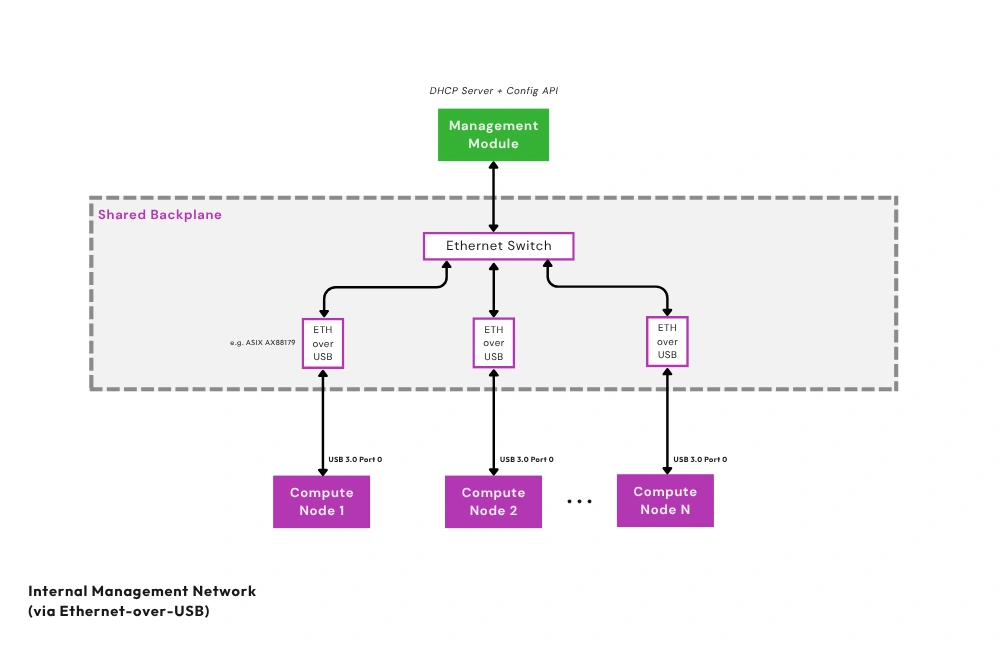
The Private Enclosure Network (PEN) is a dedicated control-plane fabric completely isolated from the NN. Each installed Compute Node connects to the PEN using one of its USB 3.0 signals. On the Enclosure backplane, USB-to-Ethernet bridges repackage passing signals. Finally, a dedicated internal Ethernet switch connects the bridges to the Management Module.
Operations that are handled solely on the PEN include telemetry, recovery, provisioning, and power control. The PEN’s isolation allows administrators to access Compute Nodes even when there is an issue with the NN or with the Compute Node itself. For security, we use port isolation to prevent Compute Nodes from communicating with each other through the PEN. Further, users can disable the PEN via an internal jumper that cuts power to the network's Ethernet switch, isolating Compute Nodes from the Management Module.
Our design appropriates the clean, space-efficient, and unified form factor of enterprise blade servers in a more affordable, modular, and interoperable package. Users do not need to wire an Ethernet cable to each Compute Node and connect all the cables to a separate switch. Beyond reducing cable clutter and consolidating hardware, these two internal networks also simplify procurement and inventory management. They also reduce potential points of failure. Meanwhile, the Management Module provides users with a replaceable, vendor-agnostic, and scalable management tool.
How the Management Module works with the PEN
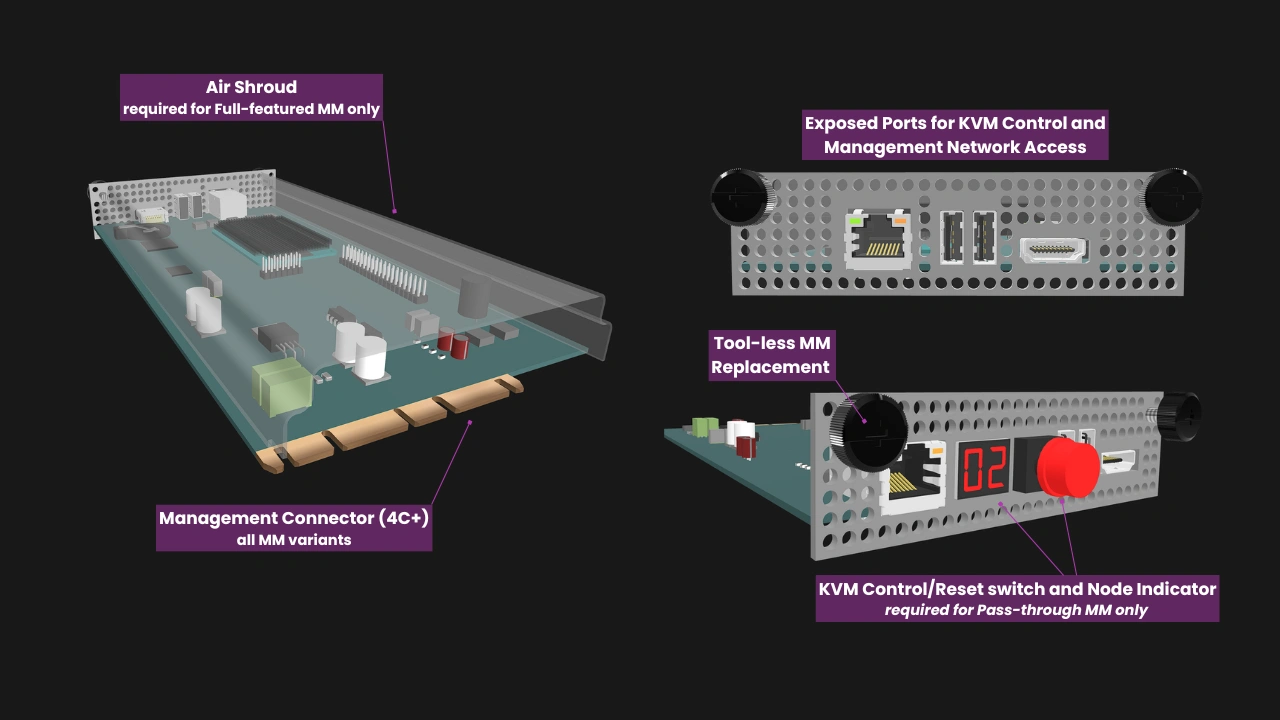
Even at its simplest implementation, the Management Module is more than a KVM device. It serves as the interface between administrators and the PEN.
To further segment the networks involved in an Enterprise Enclosure, we also define the External Management Network (EMN). The EMN is whatever external network administrators use to connect to the Management Module. The available options for the EMN depend on the capabilities of the installed Management Module. For instance, our reference design for the Pass-through Management Module is a simple local KVM device with an RJ45 interface. In this design, the EMN involves a direct connection to that interface. It is perfect for deployments where only local access is required. Because of its simplicity, a Pass-through Management Module could be affordable enough to be kept in stock as a fallback device.
On the other hand, our Full-featured reference design is a full-fledged computer. This smart Management Module terminates the PEN on its CPU and software, and exposes an RJ45 Ethernet interface for administrator access. Depending on how this interface is connected, administrators may access the module locally or remotely over a routed network. Through this connection, they can log into a web interface for remote management, including IP-KVM.
Further, the Full-featured Management Module can backup its configuration data to the Enclosure microSD card and store the Enclosure’s configuration data in its own persistent storage, enabling smooth replacements or upgrades.
Vendor options and opportunities
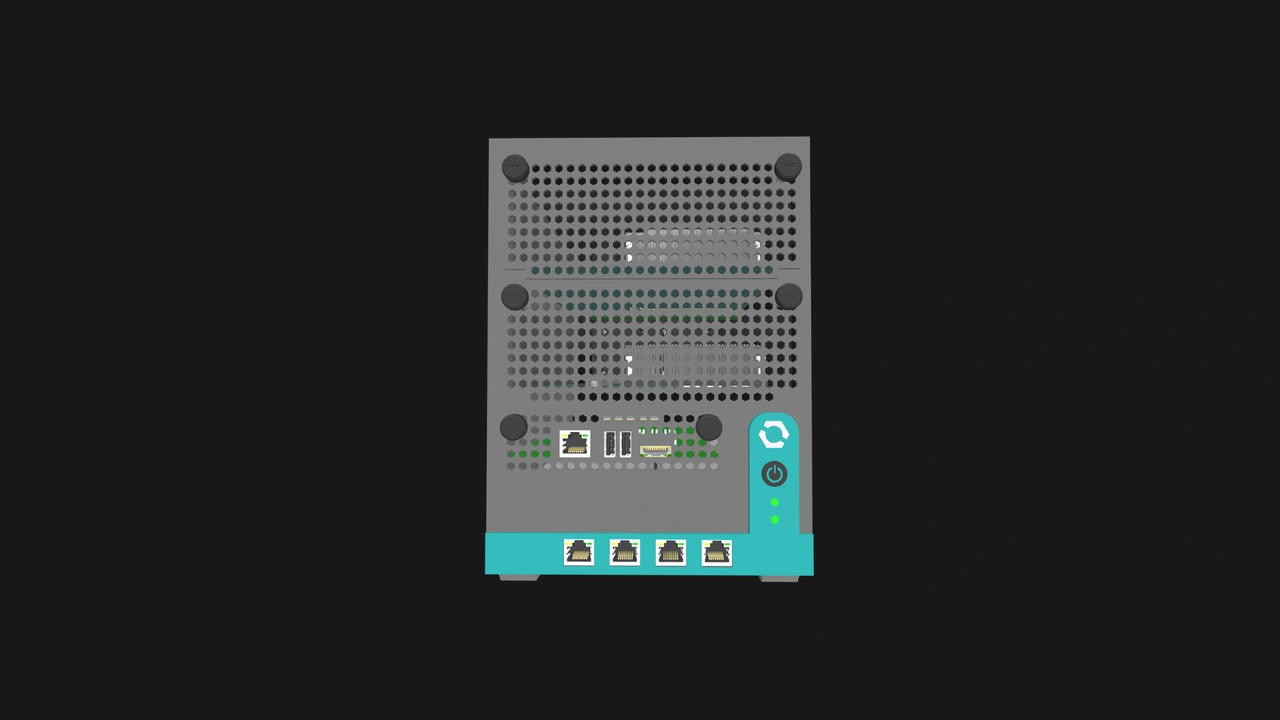
We defined the NN and the PEN as required infrastructure in Enterprise Enclosures, but vendors can build on these to create specialized devices or provide additional features.
For instance, Enclosure manufacturers can implement additional networks. A high-availability firewall appliance could have different networks for DMZ interfaces and for synchronization between redundant Compute Nodes. While a single-node Enclosure has no need for the NN, it can have a PEN and a Management Module slot. For instance, an edge appliance would likely be easier to monitor or troubleshoot if administrators have remote access to it, regardless of how many Compute Nodes the appliance has. Similarly, vendors are free to design multi-node Core Enclosures that have one or both of the required Enterprise networks.
Additionally, a Compute Node can have ports on its I/O shield, including Ethernet ports. These would be separate from the signals that are routed through the Enterprise Connector to the internal switch. This would provide the Compute Node with direct access to external systems. Vendors can also provide additional network ports on the Enclosure, or ones that are faster than the 2.5GbE minimum mandated by our standard.
It is also possible to create a Management Module that doubles as a router. It can then take advantage of an Enclosure’s internal networks to create a self-contained network appliance.
Build with OpenSFF
The two internal networks required in Enterprise Enclosures enable secure, streamlined, and scalable multi-node systems. Vendors that adopt our standard can create solutions that are more convenient, space-efficient, and scalable than DIY options, while also being more affordable and serviceable than proprietary servers.
Our networking approach reflects our standard’s interoperability and flexibility. It provides a consistent and familiar foundation, but it can be implemented and extended in a variety of ways, from compact home servers to managed edge devices.
We encourage you to read our specifications, and we would be grateful if you help spread the word about OpenSFF. For technical clarifications, partnerships, and other inquiries, reach out to our development team at [email protected].
Other Articles

Meet OpenSFF: an open hardware standard that enables cross-vendor compatibility, modular systems, and sustainable hardware reuse.
August 11, 2025
We go over the rise of virtualization and the open software adopted by home server enthusiasts, as well as the current challenges and the future of the hobby.
September 06, 2025

Learn why OpenSFF adopted the SFF-TA-1002 connector standard and how it enables our vision.
September 18, 2025