Blog
Small, Scalable, Sustainable: An Overview of the OpenSFF Compute Node
Introduction
As we emphasized in our introductory post, we created OpenSFF to develop a standard of small and modular computers that are interoperable, scalable, and serviceable. Let us take a closer look at the Compute Node’s physical design and technical features, and gain a clearer understanding of how it embodies our core pillars.
What is an OpenSFF Compute Node?
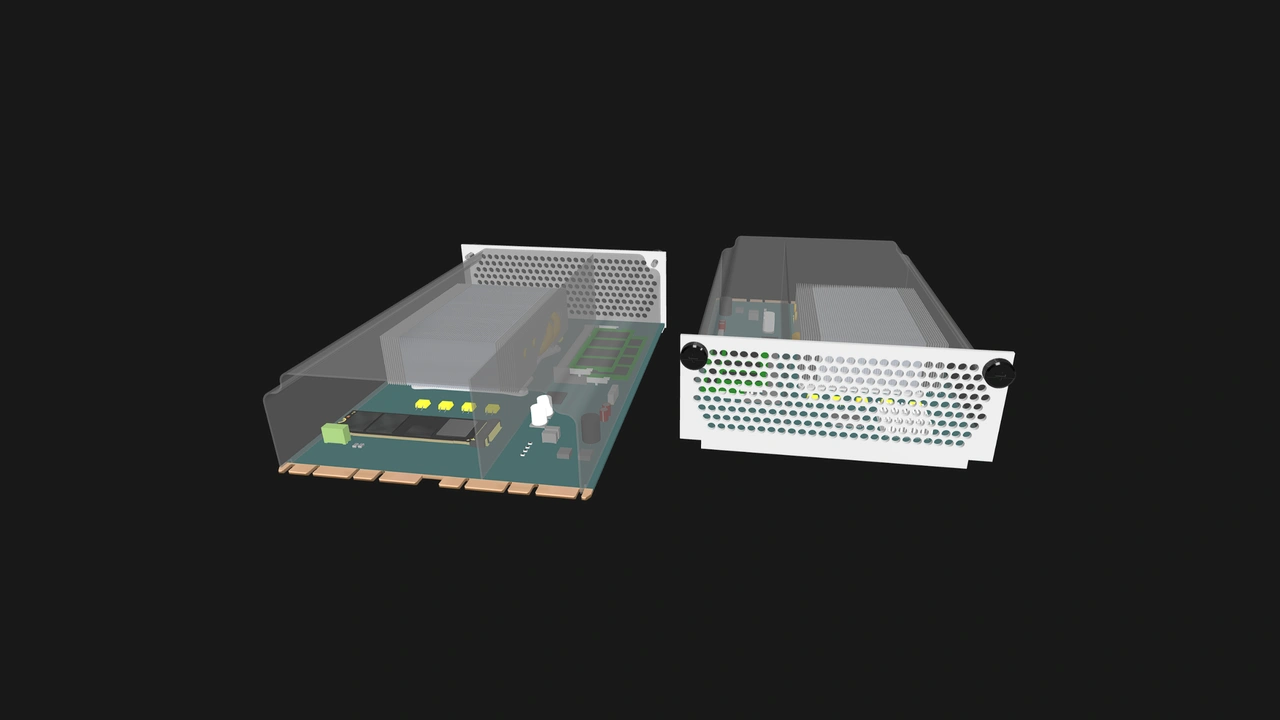
A Compute Node is a complete system board in a standardized form that:
- is about the size of a mid-range GPU
- can be configured with a socketed or soldered-on CPU
- can have user-serviceable RAM and storage
- connects to any OpenSFF Enclosure using one or two high-speed blind-mate edge connectors
- is designed to be scaled into a modular setup, with a variant that provides additional interfaces for more complex deployments
Dimensions and key physical features
Compute Nodes have defined dimensions to ensure compatibility with all Enclosures, including ones with multiple node bays.
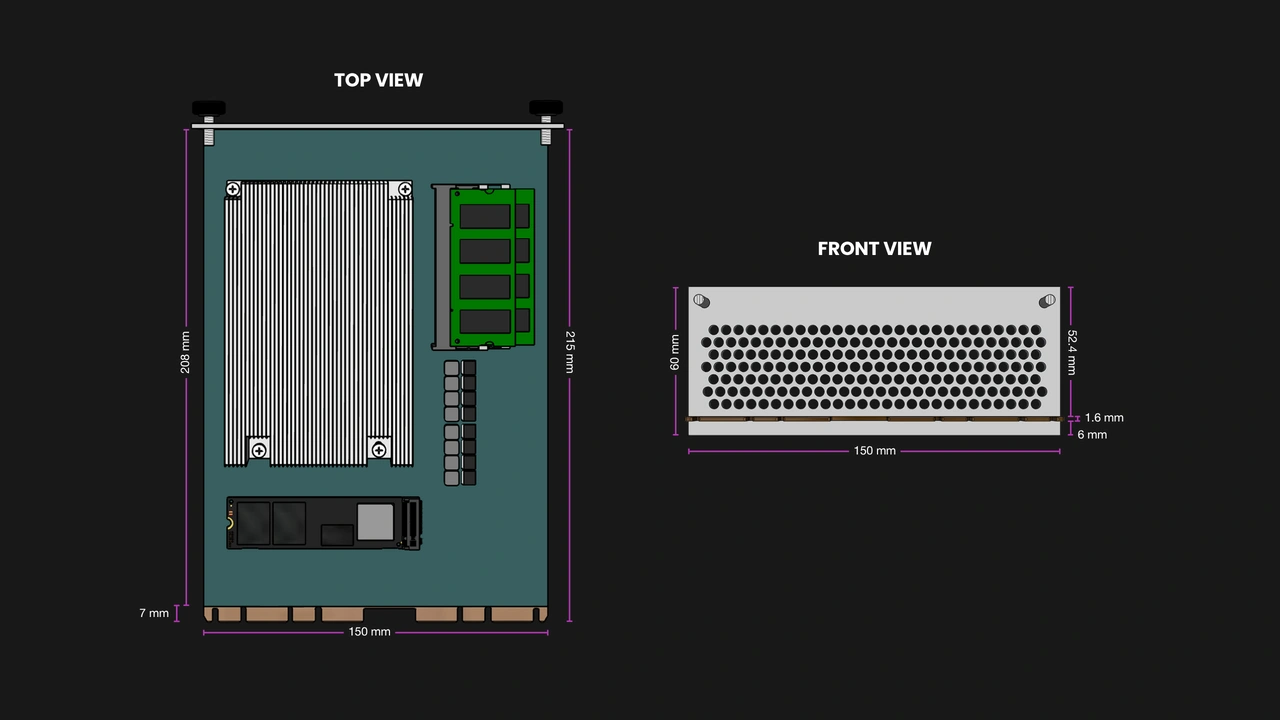
- Length: 215 mm (~8.5”)
- Width: 150 mm (~5.9”)
- Height: 60 mm (~2.4”)
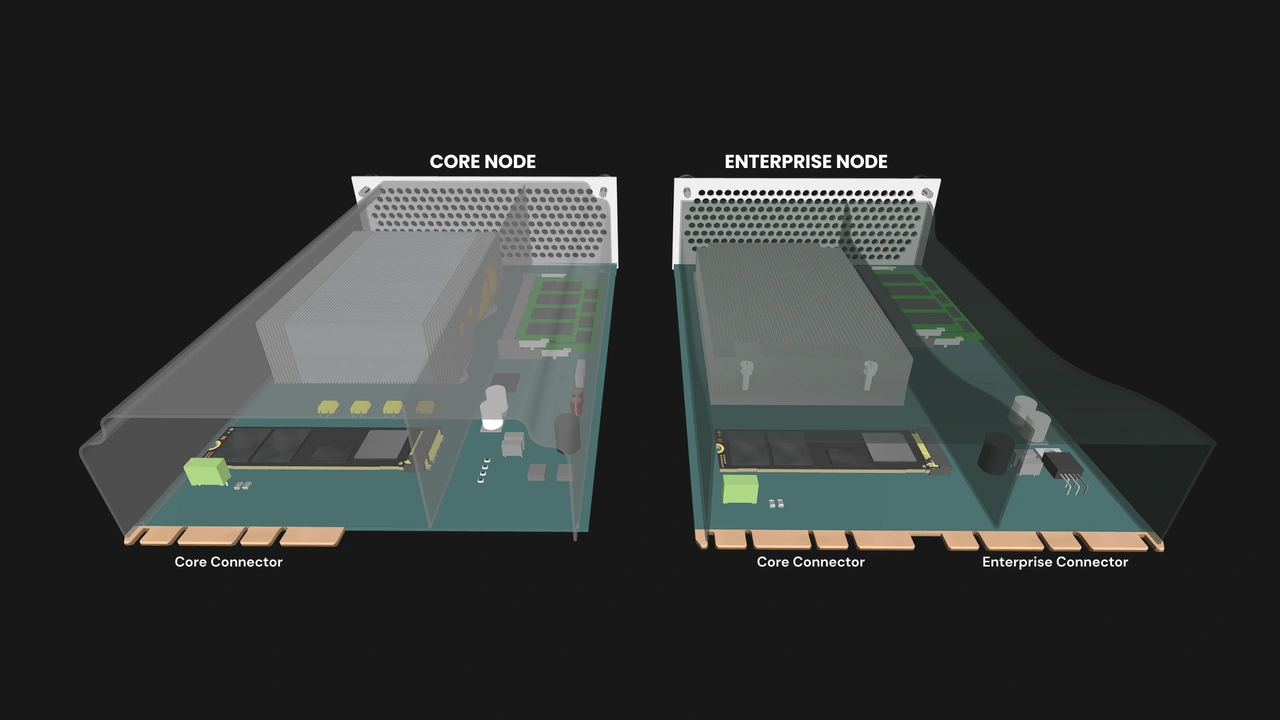
Manufacturers are free to design the board’s layout and select components as long as they adhere to the interface and mechanical requirements defined in the specification, including:
- One or two edge connectors for data, power, and I/O
- Defined keep-out zones for serviceability and enclosure fitment
- A pair of vertical guide rails for alignment and protection
- A shroud for cooling and protection
- A metal shield for I/O, airflow egress, and EMI shielding. The I/O shield must also have a pair of captive M4 thumbscrews to mount the Compute Node into an Enclosure.
The user-friendly mounting solution is only part of the specification’s serviceability requirements. In general, Compute Nodes must be field-serviceable using only non-specialized tools.
Core and Enterprise classes
Compute Nodes (and Enclosures) come in two classes:
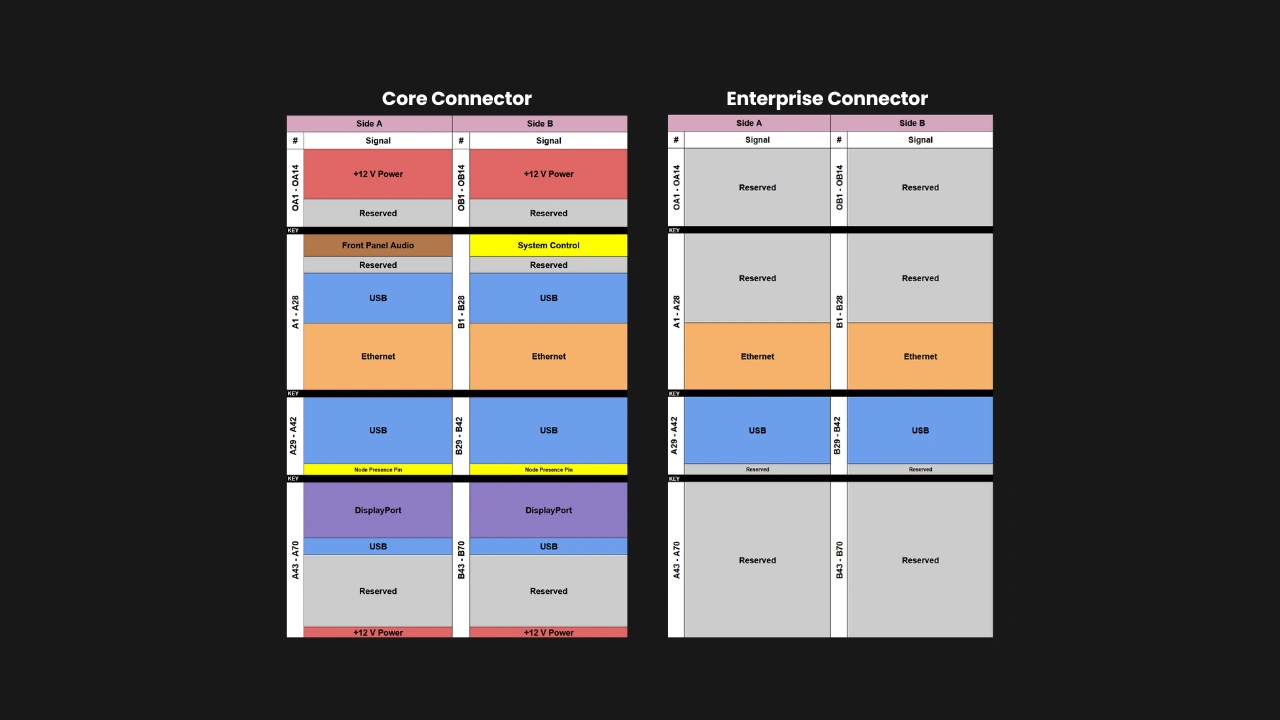
- Core Compute Nodes are meant for general use and support the interfaces required in modern computers.
- Enterprise Compute Nodes are meant for managed multi-node systems, and as such support additional interfaces on top of the ones supported by Core Compute Nodes.
All Compute Nodes are mechanically and electrically compatible with all Enclosures, but the full functionality of Enterprise Compute Nodes can be accessed only by pairing them with Enterprise Enclosures. This ensures interoperability while still guaranteeing a minimum set of advanced features for users that do need Enterprise-class systems.
The connector
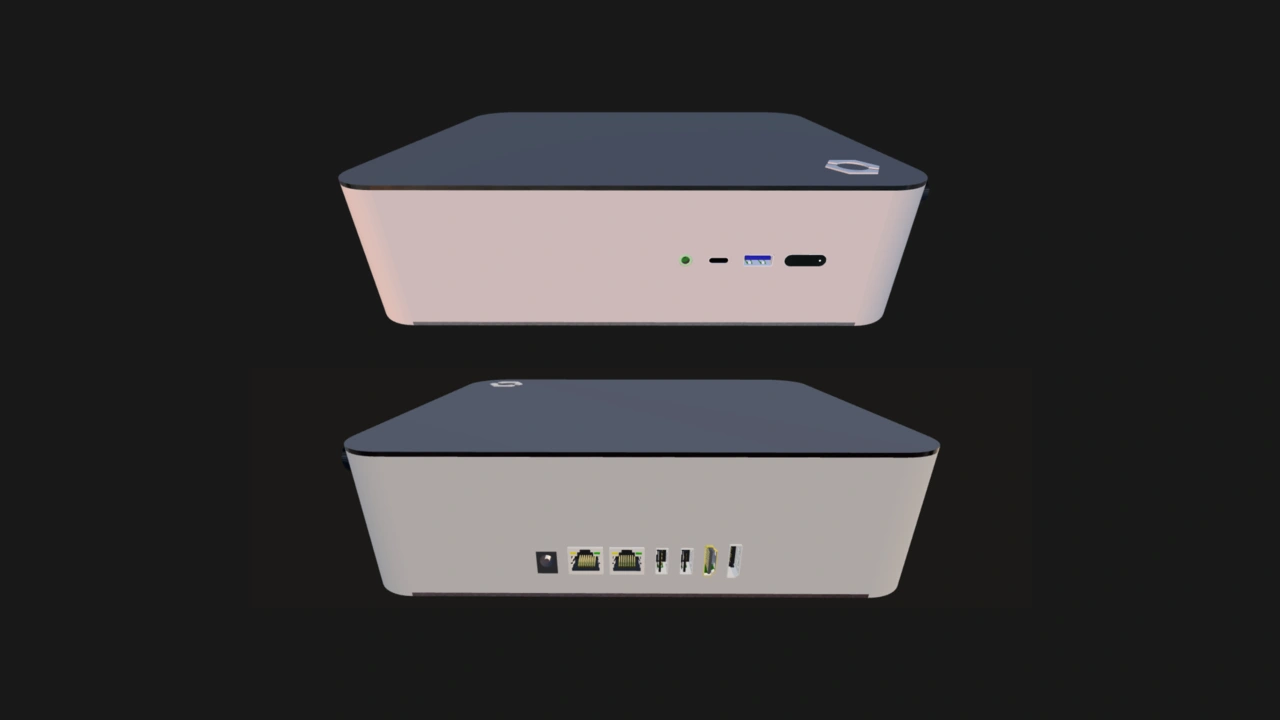
One of the key enablers of our core pillars is the standardized edge connector. It is based on the SFF-TA-1002 specification, but with a custom pinout. It promotes serviceability and simplifies enclosure design.
- Core Compute Nodes have a Core Connector (SFF-TA-1002 4C+). It carries power, USB, Ethernet, DisplayPort, and control signals.
- Enterprise Compute Nodes have both a Core Connector and an Enterprise Connector (also SFF-TA-1002 4C+). The latter carries two more Ethernet signals and an additional USB-C signal.
Power and I/O
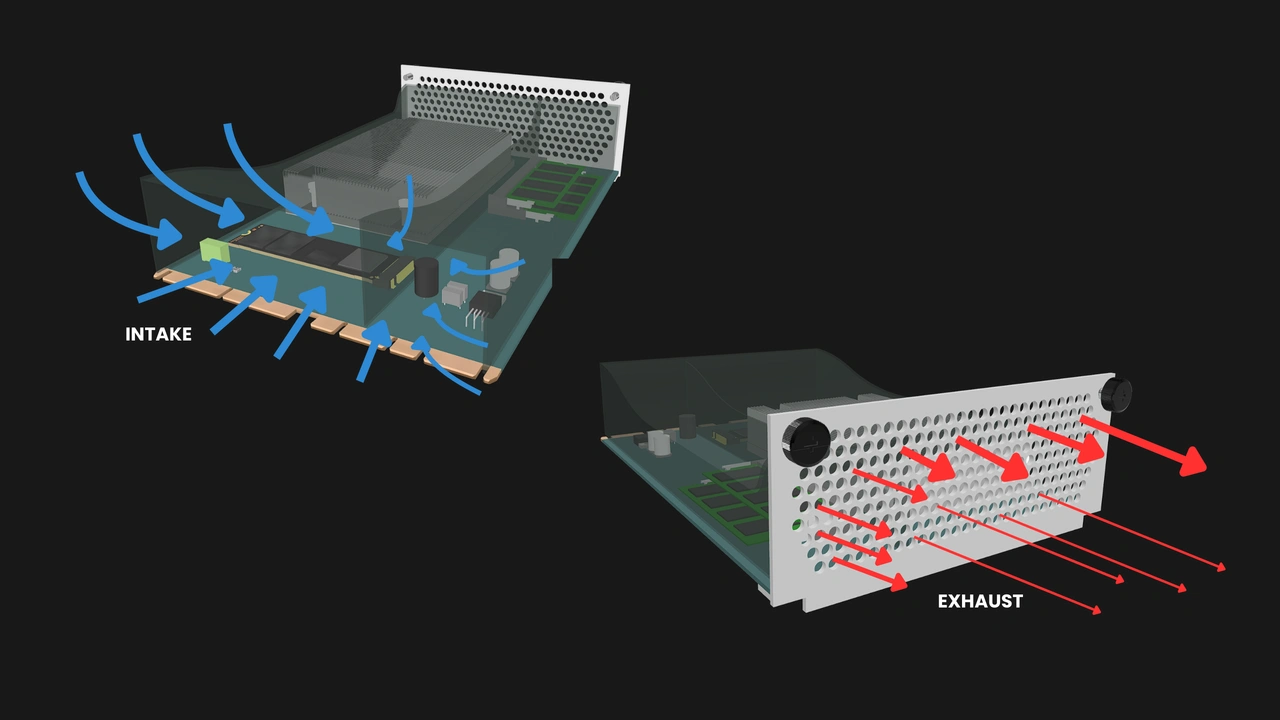
The Compute Node specification’s minimum requirements provide adequate power and connectivity for intended use cases, while providing vendors plenty of room to differentiate and innovate.
Power
- Delivered as 12V DC via the Core Connector
- 120W maximum power target, enough to use a 95W CPU alongside other components
Networking interfaces
- Core Compute Node: Two 2.5GbE (or faster) via the Core Connector
- Enterprise Compute Node: The Ethernet interfaces on the Core Connector plus two additional 2.5GbE (or faster) via the Enterprise Connector, for a total of four Ethernet interfaces
USB interfaces
- Core Compute Node:
- Two USB 2.0 Type-A
- One USB 3.0 (or newer) Type-C
- One USB 3.0 Type-A
- This may be used for external connectivity in unmanaged Enclosures, but it must be routed to an Ethernet-over-USB interface in managed Enclosures to facilitate node management.
- Enterprise Compute Node:
- The USB interfaces on the Core Connector plus one additional USB 3.0 (or newer) Type-C on the Enterprise Connector
Display interface
- One DisplayPort 1.4 (or newer)
Front panel connectors
- Power button
- Reset button
- LED power status indicator
- Audio (stereo line out and mic)
Manufacturers may also provide additional external connectivity for both Core and Enterprise Compute Nodes through the I/O shield.
Thermal design and airflow
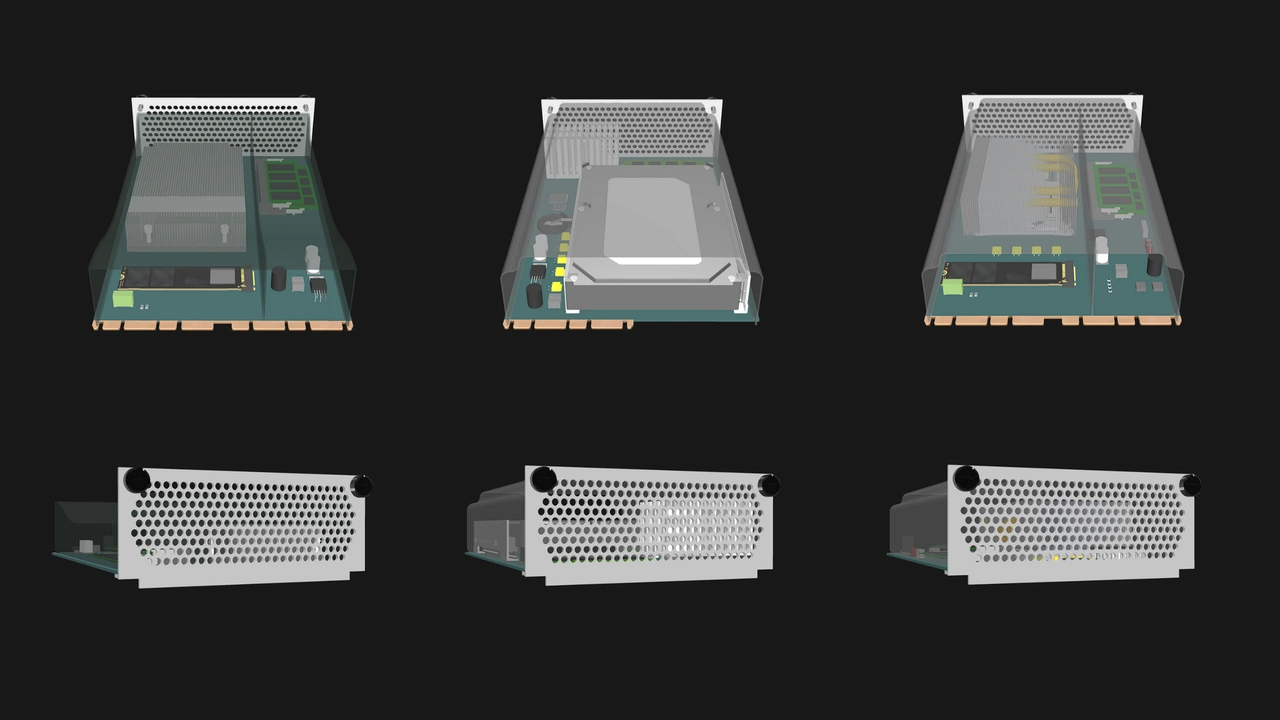
Compute Nodes must have a plastic shroud to direct air. Any form of active cooling must be built into the Enclosure. The shroud creates a sealed channel that guides air through the components and out through the perforations in the I/O shield.
- Operating ambient temperature: 10°C to 35°C
- Maximum power target: 120W
- Must not rely on user-replaceable air filters to operate in typical indoor air conditions
Design and feature flexibility
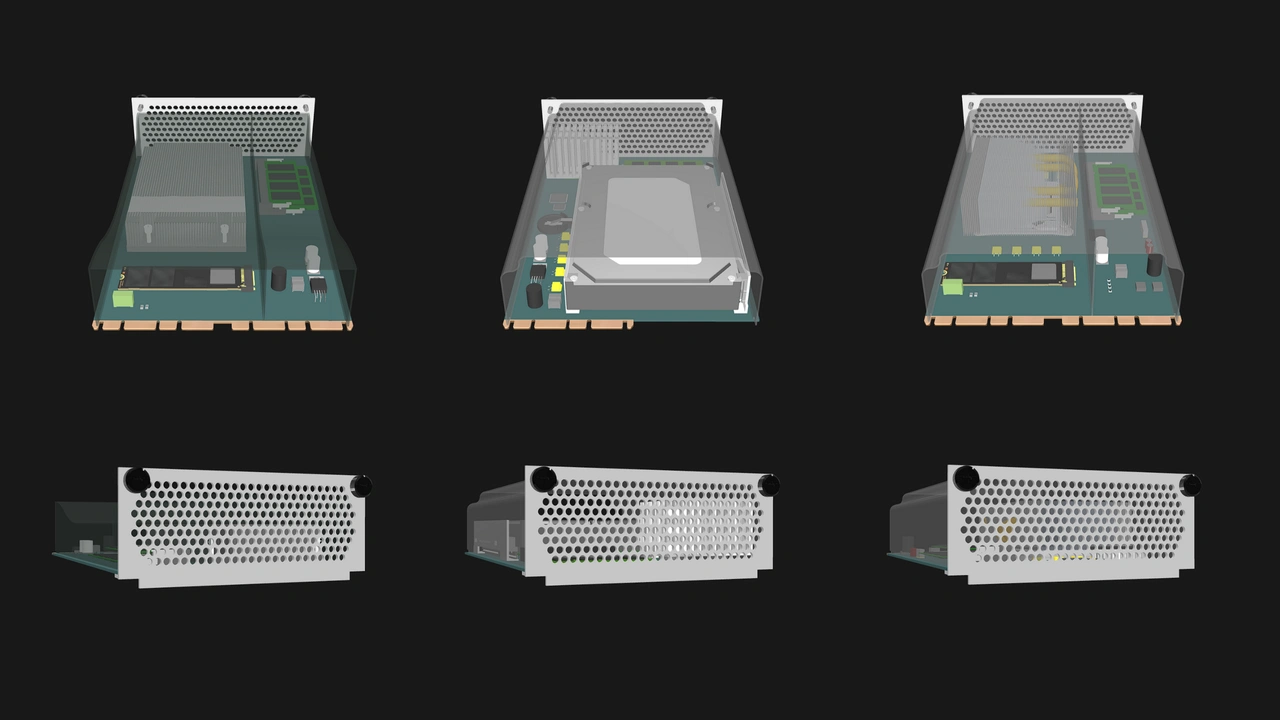
A key strength of OpenSFF specifications is that it ensures compatibility without dictating how Compute Nodes should be built.
Manufacturers decide:
- The board layout
- The components and component slots, including:
- CPU: socketed or soldered on; Intel or AMD
- RAM: SO-DIMM, CAMM, or soldered
- Storage: SATA, NVMe, soldered eMMC, or a combination of the three
- Additional I/O or better connectivity standards, such as extra video outputs, 10GbE ports, or peripheral controllers
This enables vendors to put together Compute Nodes for different use cases and budgets, such as:
Performance-oriented
- AMD Strix Halo APU
- 64GB RAM (soldered)
- 8TB storage (2x 4TB M.2 NVMe SSDs)
- Two DisplayPort 2.1 ports
Stable and field-serviceable
- Socketed 35W CPU
- One or two SO-DIMM slots
- One M.2 NVMe slot and a SATA port
- Toolless access to memory and storage
- I/O shield optimized for dust-resistance
Multi-node server processing unit
- 15W to 25W CPU
- One or two SO-DIMM slots
- One M.2 NVMe slot and a soldered eMMC
- Enterprise-class for additional network interfaces
Build with OpenSFF
The Compute Node is much more than the sum of its parts. It is a platform that prioritizes choice, modularity, and serviceability while leaving plenty of room for innovation and differentiation.
We invite you to read its specifications, and we would be grateful if you help spread the word about OpenSFF. For technical clarifications, partnerships, and other inquiries, reach out to our development team at [email protected].
Other Articles

Meet OpenSFF: an open hardware standard that enables cross-vendor compatibility, modular systems, and sustainable hardware reuse.
August 11, 2025
We go over the rise of virtualization and the open software adopted by home server enthusiasts, as well as the current challenges and the future of the hobby.
September 06, 2025

Learn why OpenSFF adopted the SFF-TA-1002 connector standard and how it enables our vision.
September 18, 2025