Blog
Console Wars: KVM Devices and OpenSFF’s Hybrid Alternative
Introduction
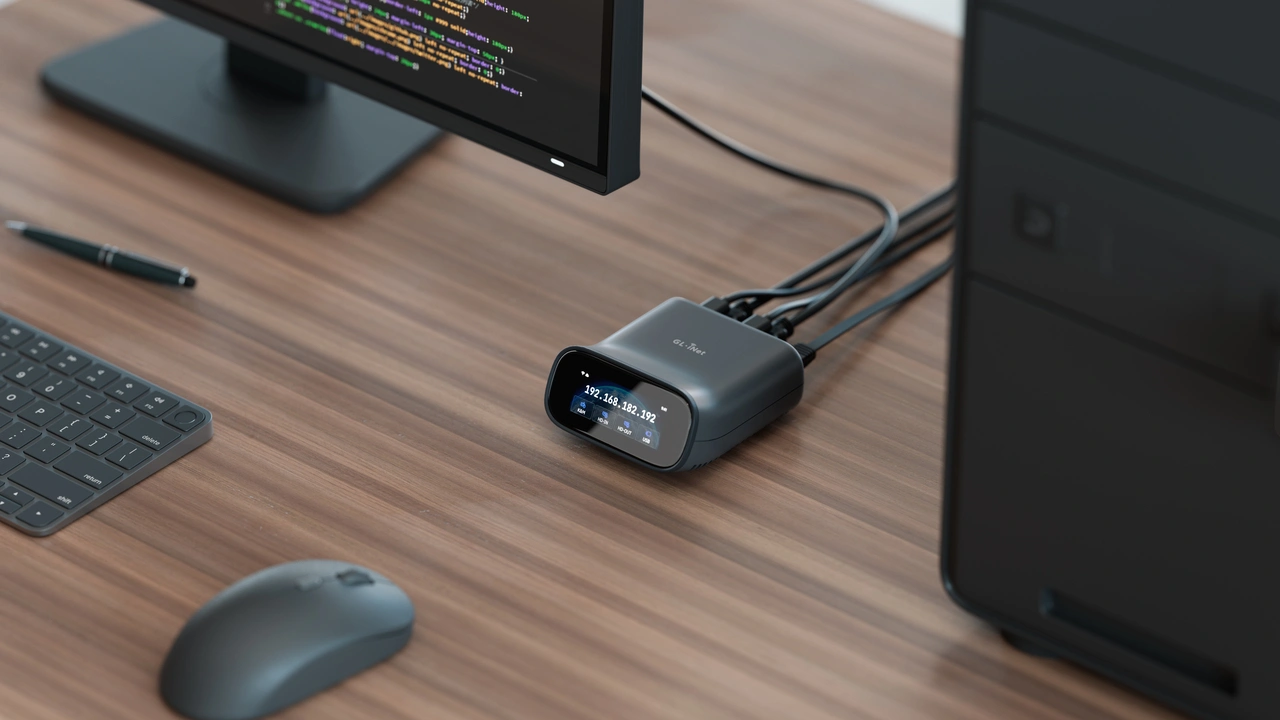
A headless configuration is one of the commonly cited distinguishing factors between a server and a PC. But that is true only from the end user’s perspective; server administrators still need a reliable way to access their hardware. When something inevitably goes wrong, often the administrator’s biggest issue is that they are not in the room. Perhaps the operating system also crashed, or the machine got stuck before the OS even loaded. In the case of the latter, a remote desktop connection is not going to help. The most reliable solution is a KVM device.
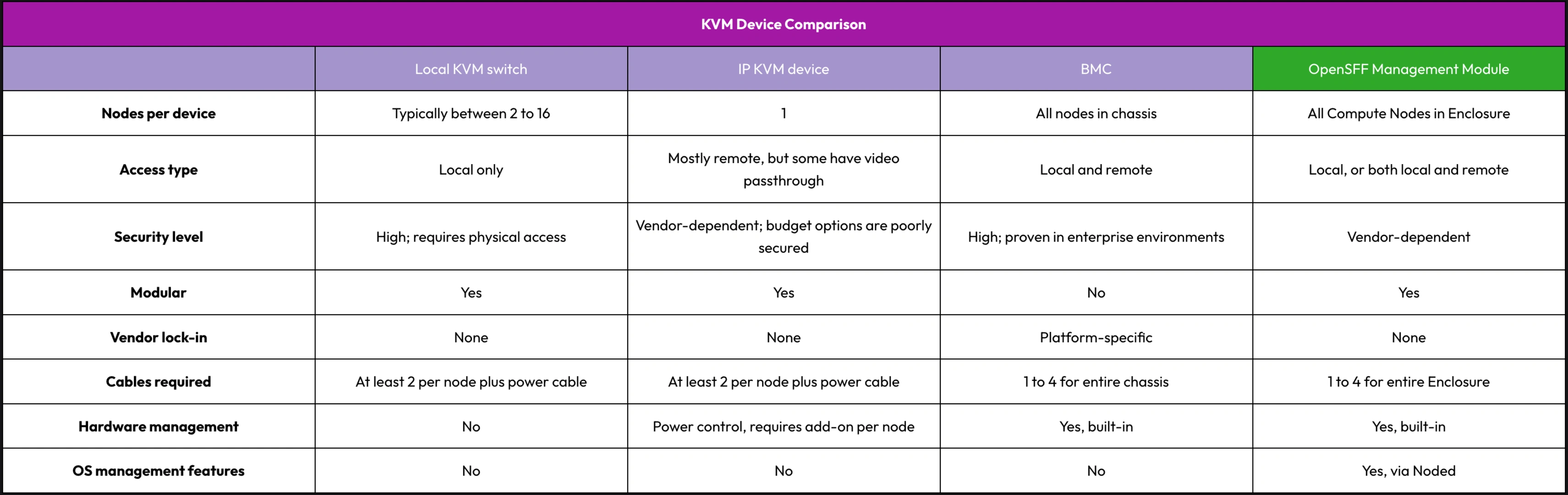
In this article, we are going to go over four types of KVM devices, including our standard’s solution. We are going to compare how many nodes they can cover, the type of access they provide, their level of security, and any additional capabilities beyond console access.
Local KVM switch
A local KVM switch uses cables to share one set of peripherals—display, keyboard, and mouse—across multiple machines. It does not require software, networks, or encoding, significantly simplifying the stack and providing the least attack surface. Besides security, coverage is another strength of local KVM switches. One switch can cover as many machines as it has ports, with most models offering between 2 to 16 ports. The TESmart HKS801-P23 and the Level1Techs dual monitor KVM are popular local KVM switches among enthusiasts and businesses with constrained rack space.
While the local connection is a dealbreaker for most server administrators, cable management is also a potential pain point that you must consider. At minimum, you need to connect one video cable and one USB cable per machine. This becomes a meaningful challenge as node counts grow.
Overall, a local KVM switch is a practical, highly secure, and cost-efficient tool if you can guarantee regular presence on-site.
IP KVM device
An IP KVM device digitizes a node’s video output, emulates USB peripherals, and streams the signals over a network to a web browser or other remote client. Despite the digital overhead, IP KVM devices still work below the operating system layer. You can use them during a kernel panic, when configuring the BIOS, or to install an OS from a virtual disc. The growth of the home server community led to the rise of today’s affordable IP KVM options. Devices such as the PiKVM, JetKVM, and GL.iNet Comet Pro provide plug-and-play remote console access at a fraction of the cost of enterprise solutions.
IP KVM devices are direct opposites of local KVM switches. They provide remote access, but the options we cited connect to only one server. Eight servers means eight IP KVM devices, and eight endpoints to secure, monitor, and maintain. Some of these devices can also provide remote power control, but that involves wiring and installing an optional ATX adapter board, once again to each server you want to control. Cable clutter is just as problematic with IP KVM devices as it is with local KVM switches.
But the biggest tradeoff of affordable IP KVM devices is not cable or device clutter. It is actually security. Cybersecurity platform Eclypsium tested several popular IP KVM devices and found critical vulnerabilities across all models. The company points out that these vulnerabilities involve basic security measures that were either poorly executed or not implemented at all, such as firmware validation or root authentication.
These issues do not necessarily disqualify affordable IP KVM devices as viable options. But since we are dealing with hardware that provides BIOS-level access, it does mean that your security overhead will multiply with every IP KVM device you connect to your servers.
BMC in enterprise servers
Proprietary servers from major vendors such as Dell, HP, and Supermicro have a Baseboard Management Controller (BMC) soldered in their motherboard. A BMC has its own processor, memory, and network stack, and is deeply integrated into its server’s hardware. As a result, IP KVM is just one of the many features that a BMC provides. A BMC can also deliver data from hardware sensors, such as temperature, voltages, or fan speeds. It can log events, provide remote power control, automate server configuration, and more.
BMCs have numerous security features, such as role-based access control, encrypted IP KVM sessions, and firmware validation. Enterprise servers also typically have hardware-based security, whether through the CPU or on a dedicated chip, and they enforce network isolation for server management via a dedicated network fabric or VLAN.
On the other hand, integration is also the biggest constraint of BMCs. Unlike the discrete devices we discussed, each company’s BMC works only with its specific line of servers. You must completely buy into a vendor’s server platform to use its BMC.
Beyond the physical lock-in, enterprise server management is costly and complicated enough to be a separate discussion on its own. BMCs and enterprise servers are strictly for use cases where detailed hardware visibility is required, not just console access.
But we believe that it is possible to combine many of the benefits of a BMC with the modular, affordable, and vendor-agnostic approach of discrete KVM devices.
OpenSFF Management Module in managed Enclosures
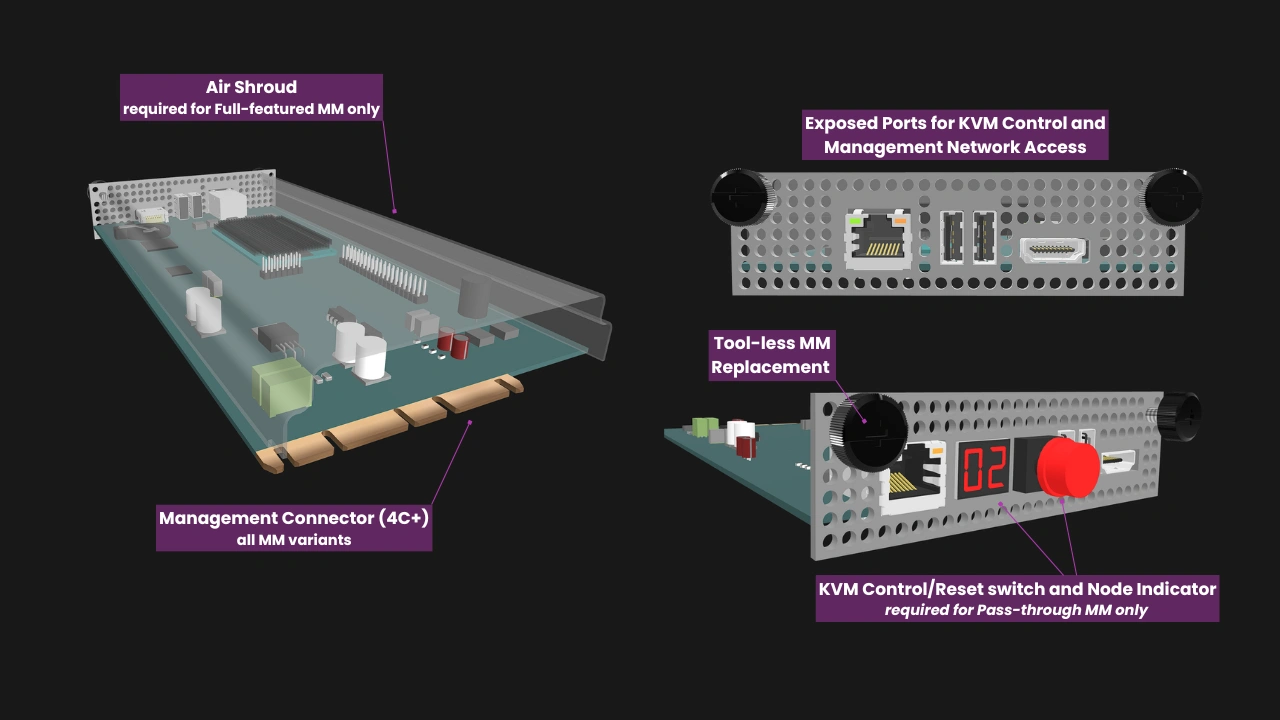
OpenSFF’s hybrid approach spins off the general architecture of blade servers. However, unlike BMCs, the Management Module provides KVM functionality and other essential management features without requiring users to commit to a single vendor. Similar to discrete KVM devices, a Management Module can be used in any compatible Enclosure regardless of their vendors. It can be installed, removed, or replaced as needed.
Further, our standard does not try to replicate BMC’s level of hardware integration. That depth is rarely necessary for the environments we target: multi-node systems outside traditional datacenters. SMBs, edge deployments, homelabs, and other use cases at similar scales require an affordable, modular, and serviceable KVM solution.
For the KVM functionality, each installed Compute Node provides one USB 2.0 uplink and one DisplayPort output to the Enclosure’s backplane. The Enclosure routes these signals over backplane traces to its dedicated Management Module slot. The Management Module drives the USB and DisplayPort multiplexers, allowing access to one node console at any given time.
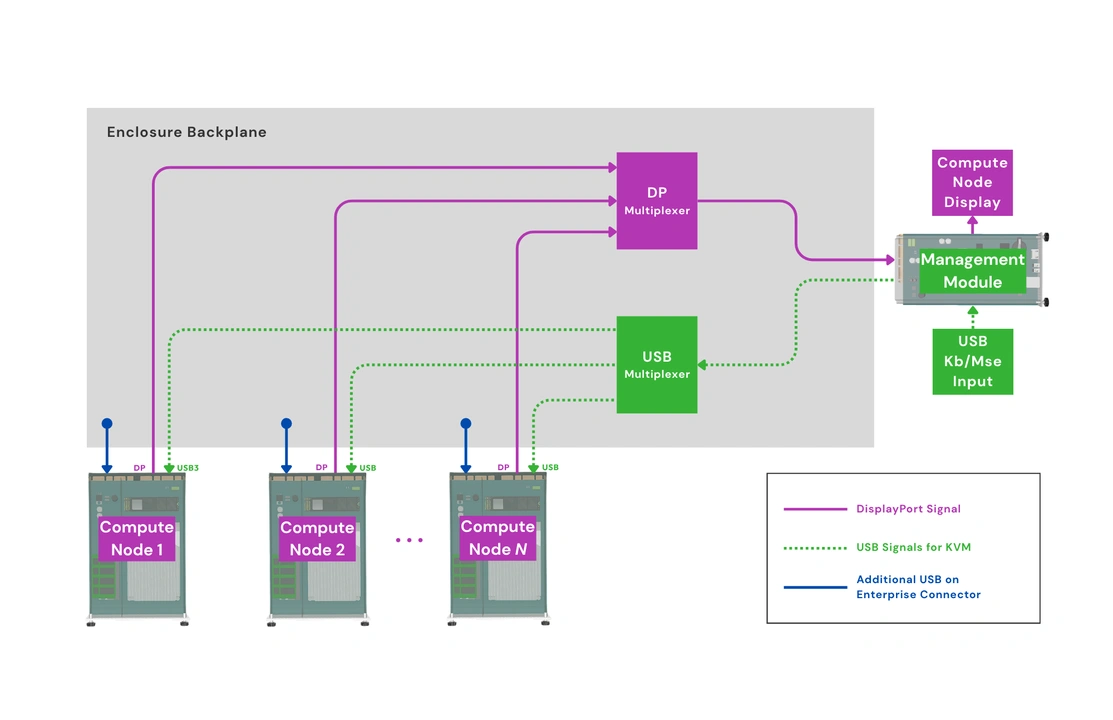
In addition, Compute Nodes route one USB 3.0 signal to the Enclosure backplane to connect to the Private Enclosure Network (PEN), an internal out-of-band management network. In short, the KVM and Ethernet switch components are integrated into the Enclosure backplane. For remote access, the only external requirement is a network cable connected to the Management Module.
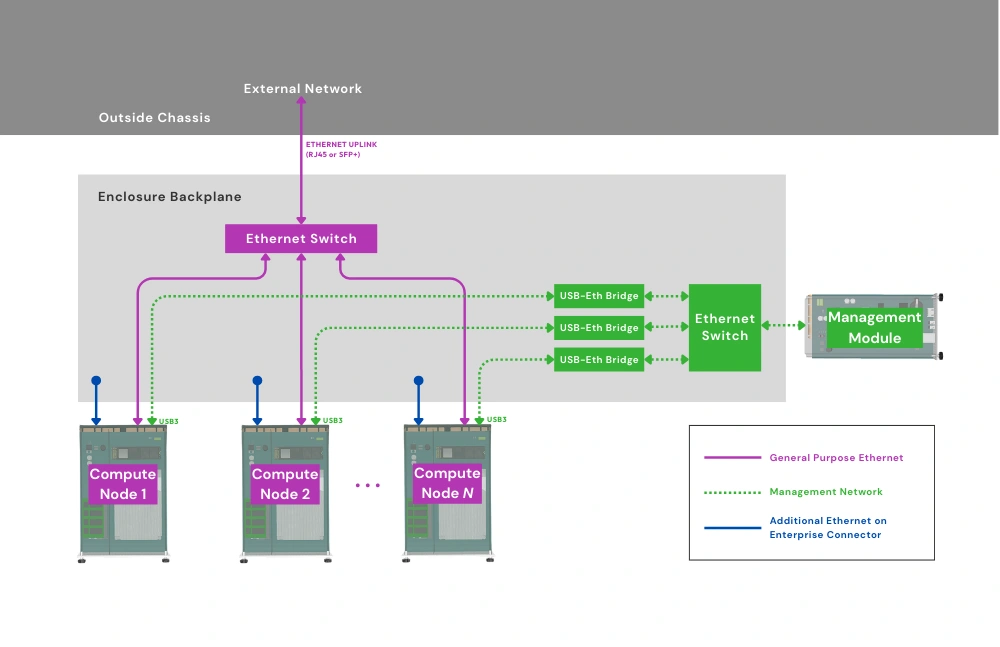
Vendors can create a variety of Management Modules, from one that simply acts as a local KVM switch to an advanced remote management controller. The latter can provide IP KVM, remote power control, event logging, and other essential management features through a web interface. You can start with a basic Management Module that provides only local access, then replace that with a variant that adds IP KVM and other remote management features as needed.
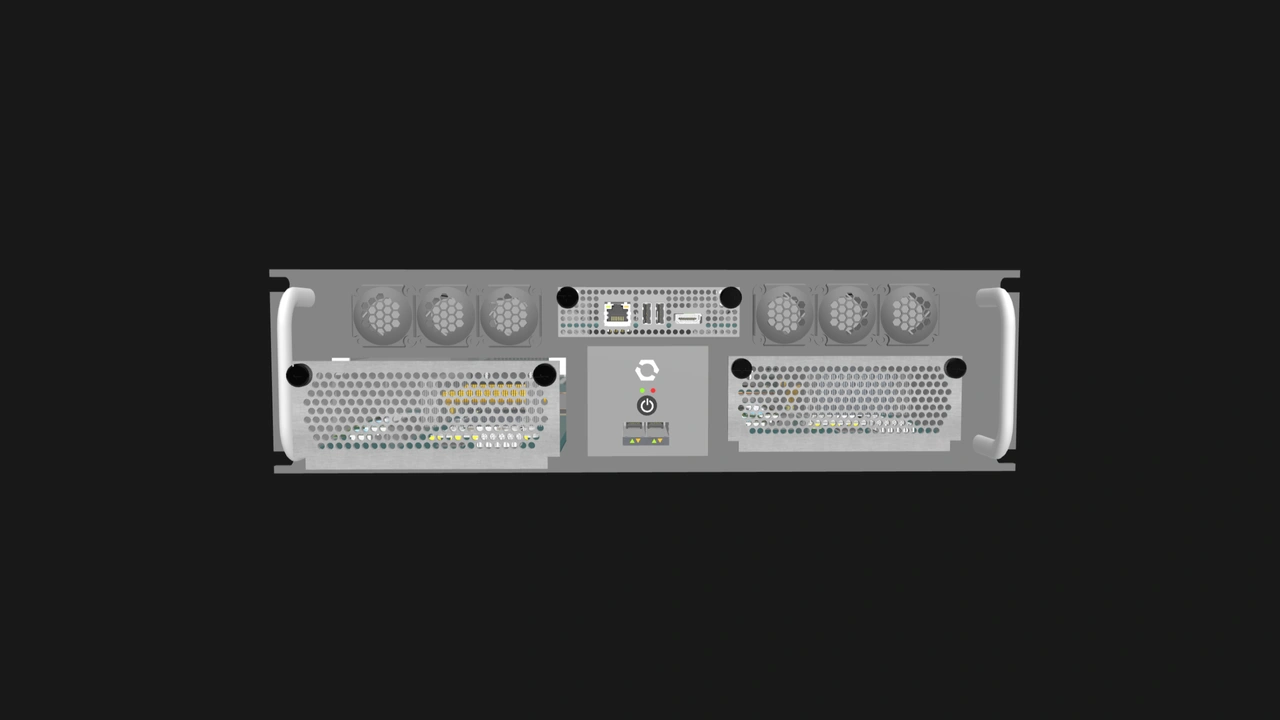
Regardless of its capabilities, a Management Module occupies the same dedicated Enclosure slot. It is secured via two captive thumbscrews and can be swapped without disassembling the Enclosure or interfering with installed Compute Nodes. It can also be migrated to other Enclosures, enabling streamlined and scalable upgrade paths.
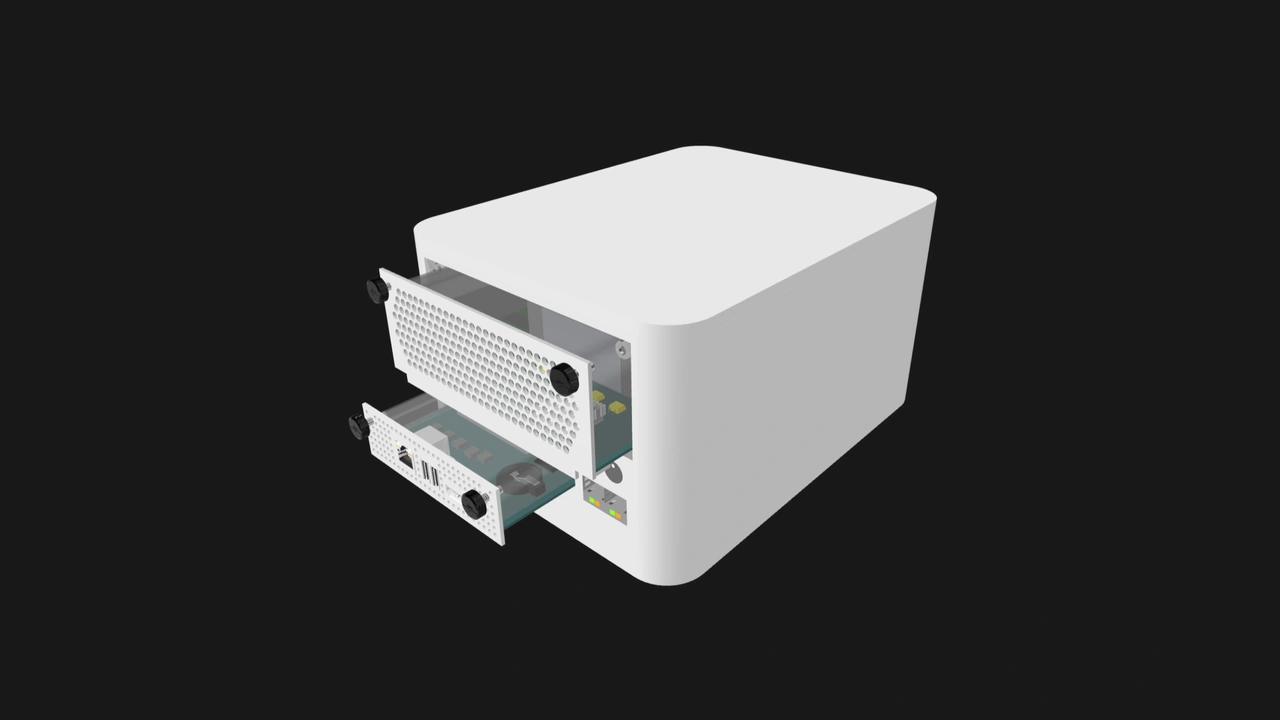
With smart Management Modules, there is no need to configure and secure an IP KVM device per Compute Node, and there are no additional network endpoints to maintain. We are building a default Management Module software that vendors can adopt or use as a foundation. We are also developing noded, an optional software daemon that will enable deeper integration at the OS level.
The daemon will enable smart Management Modules to provide essential server management features that are out of the scope of the discrete KVM devices we discussed. For instance, it can create backups of Compute Node configuration files, making Compute Node replacements simpler. It can also receive event logs and information about Compute Node hardware for monitoring and diagnosis. Noded can also facilitate OS provisioning and store encryption keys.
Management Modules that take advantage of noded will have a significant advantage over affordable IP KVM options, apart from the other benefits we mentioned. That said, besides noded being optional, users can also opt to have a more isolated OpenSFF system even when using a Management Module that adopts the daemon. Managed Enclosures will have a removable jumper on the power rail of the PEN’s Ethernet switch. This allows users to disable the PEN, which would also prevent noded from sending information about Compute Nodes to the Management Module.
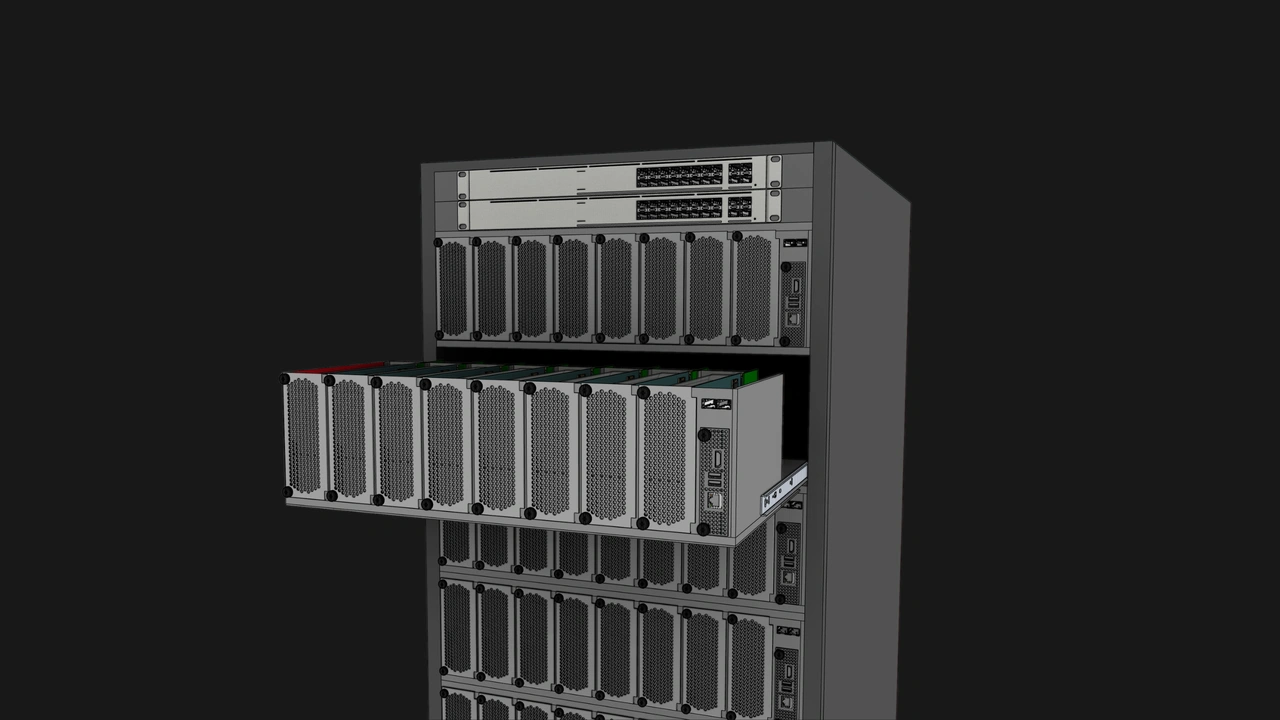
On the Enclosure side, vendors can add support for the Management Module on everything from single-node systems to dense multi-node servers.
Build with OpenSFF
Our modular approach has no direct equivalent in the KVM or server management markets. We combine most of the practical benefits of existing solutions in an interoperable, scalable, and serviceable open standard.
A vendor can specialize in Management Modules and invest in developing high quality IP KVM or other remote management features, assured that their product will work with every compatible Enclosure and Compute Node regardless of their manufacturer. The same goes for the Enclosure. Vendors can focus on certain form factors or use cases, knowing that their product can be managed by any OpenSFF-compatible Management Module. Ultimately, vendors will compete on aspects that matter to users, and participate in a shared ecosystem with a wide range of potential customers.
We encourage you to read our specifications, and we would be grateful if you spread the word about OpenSFF. For technical clarifications, partnerships, and other inquiries, reach out to our development team at [email protected].
Other Articles

Meet OpenSFF: an open hardware standard that enables cross-vendor compatibility, modular systems, and sustainable hardware reuse.
August 11, 2025
We go over the rise of virtualization and the open software adopted by home server enthusiasts, as well as the current challenges and the future of the hobby.
September 06, 2025

Learn why OpenSFF adopted the SFF-TA-1002 connector standard and how it enables our vision.
September 18, 2025