Blog
Prototyping the Management Module, Part 2: Software
Introduction
Welcome to the second part of our Management Module development update. In our previous development update, we went over how we’ve been putting together test hardware to validate the Management Module’s core functionality. Our initial tests have been promising, and we’re confident that the Raspberry Pi Compute Module 5 can handle the physical layer of remote management.
The software side has been equally interesting. We’re figuring out how to build a no fuss remote management tool for multi-node systems, while running on hardware that can access only one node at a time. No fancy embedded silicon. We’re going for a user-replaceable device that can be implemented in a variety of ways, including affordable ones.

Our development process has been enlightening, fun, and rewarding. Most of all, it has reinforced our early assumptions about why we made OpenSFF in the first place.
Building a VNC client from scratch
As we mentioned in our overview of the Management Module software, we want it to be as simple and frictionless as possible. That includes having a browser client. No signups, client software or local apps needed. This constrained what technologies we can use.
We initially thought of adopting existing Flutter VNC solutions, specifically flutter_rfb or dart_rfb. They’re solid packages that would’ve saved us a lot of time. But we discovered that they’re not meant for web-based implementations, because they both import dart:io for raw TCP socket connections. So we decided to build our own client.
We tested two approaches: our software team lead Aldrin Bobita experimented with a VNC decoder in Rust that would compile to WebAssembly, while our frontend developer Ivanne Bayer went with a pure Dart implementation. Both prototypes worked, but Aldrin found the dart:js library very tricky to work with. So we decided to pursue the more straightforward Dart version, seeing as Ivanne’s early build was already functional.
Improving the client’s performance
We implemented several encoding methods to make our client more responsive: CopyRect, Hextile, Desktop Size Pseudo-encoding, and ZRLE. But the client still felt sluggish. Testing on a connection with around 220ms average latency, the team saw rendering delays of up to 1500ms when there were significant changes between frames.
Ivanne looked at several existing VNC clients to see how we could improve ours. We became particularly interested in noVNC. It’s open-source, browser-based, and performs really well. After further observation, Ivanne realized that our client was actually only spending between 100ms to 200ms on decoding. But then it would sit idle for 800ms to a full second between framebuffer updates. In short, the bottleneck was with our proxy server, not our client itself.
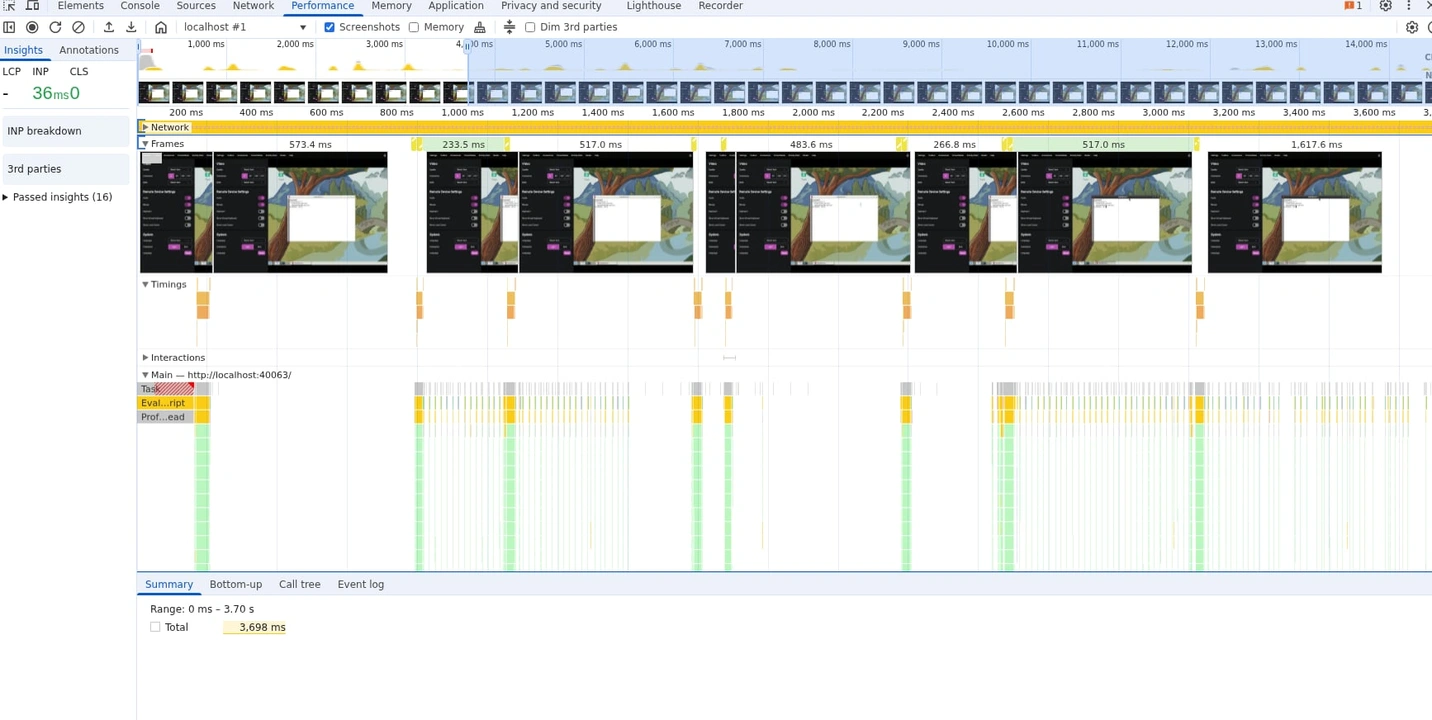
Turns out the TcpStream struct enables Nagle’s algorithm by default, which batches TCP packets to reduce network overhead. This is great for general-purpose networking, but not for VNC. We’re continuously receiving and sending small and incremental framebuffer updates. With Nagle turned on, the proxy was buffering small TCP writes and sending out an update only when the buffer reached a certain size.
Disabling the algorithm brought framebuffer updates down from 1000ms to 300ms or less. Better, but it’s no noVNC.

Ivanne kept at it and found another issue: after receiving a framebuffer, our client would parse the framebuffer header, the rectangle headers, and update the frame before requesting another framebuffer update. His fix was a concurrent pipeline: once the client parses the headers, it sends an update request immediately while continuing to decode the current framebuffer. That shaved off 100ms of idle time that was otherwise spent waiting for the server’s response. We’ll explore further optimizations down the line, but we’re happy with what we have for testing. On to the proxy.
Streamlining the VNC proxy
The VNC proxy establishes TCP connections to the VNC server, while accepting WebSocket connections from the Flutter frontend running on a web browser. To get a working build up and running, our backend developer Christian Gantuangco temporarily used a polling approach that simply accumulated TCP data from the VNC server. If no new data came in within 5ms, the proxy would send the accumulated data to the VNC client as a single WebSocket message.
That was enough for a proof of concept, but not for production. Christian started to build a way for the proxy to calculate the length of the message, but Aldrin decided to keep each component’s responsibilities clear. We let the client do the calculations on its own, instead of having two places with code to process the message.
With the proxy simplified, Christian refined how it handles authentication. The client sends the routing password, and the proxy figures out which VNC server the client should connect to and validates the password. The proxy then handles VNC authentication using the actual VNC password and performs the RFB handshakes with the VNC server. Once the authentication is complete, the proxy sends a “ready” status to the client.
This two-phase method is more secure because it doesn’t require users to enter or even know the VNC server password. It also simplifies Ivanne’s work on the frontend as that wouldn’t need to have VNC authentication logic anymore. To validate the routing password, Aldrin asked Christian to create a password resolver trait. The validation code itself would be part of the Management Module server. The proxy just knows that it was given the trait and calls it.
Creating a hybrid API
Another thing we introduced in our overview of the management software are our two APIs: the Platform API handles user-facing interactions, while Node API is for interactions between Compute Nodes and the Management Module itself. For the Platform API, Jon asked Aldrin to look into Redfish. After all, it’s a well-known management protocol and does define endpoints for many of the capabilities we want to implement.
Thanks to Aldrin’s research, the team realized that Redfish was designed for traditional enterprise servers with embedded management hardware. That proprietary component can maintain simultaneous connections to multiple nodes. In other words, node switching isn’t standard in Redfish, so Aldrin had to make a custom endpoint for this functionality.
The same goes for setting up a custom reboot schedule for the Management Module itself, as well as fetching various information that we can show on the web interface. That includes information about Compute Nodes, configurations, and even admins and their roles. These have nothing to do with managing hardware, and as such involve creating APIs that don’t adhere to Redfish.
Redfish also doesn’t implement IP-KVM or provide a remote console interface, it just allows you to configure and enable the functionality. The team decided to go with a hybrid approach with two clearly defined routes: standard Redfish endpoints where they make sense, and new endpoints for functions unique to OpenSFF.
Aldrin also spent a few days shifting the API up from Hyper to Axum. It was well worth the effort, since Axum’s centralized middleware led to authentication checks happening once per path instead of per handler function. The routing is also more readable. Keeping the code clear and easier to maintain matters a lot for our small team.
Detailing our permission-based approach
We believe that managed OpenSFF systems will be used not only as dedicated systems but as part of a larger infrastructure in multi-tenant scenarios. For example, a hosting provider could likely have an Enclosure with Compute Nodes that are rented out to different customers.
That’s why the team decided to create two permission tiers. Platform administrators have full access. They can configure network settings, update Management Modules, access all Compute Nodes, have emergency override controls, and can manage other users. Node admins on the other hand can access only the Compute Nodes assigned to them. They can control the node’s power, access its console, mount virtual media on it, and view its stats. Christian’s secure authentication on the proxy supports this two-tiered approach.
Framing the frontend
Ivanne’s initial mockups of the web interface were based on the UIs of existing IP-KVM devices such as the GL.iNet Comet Pro.
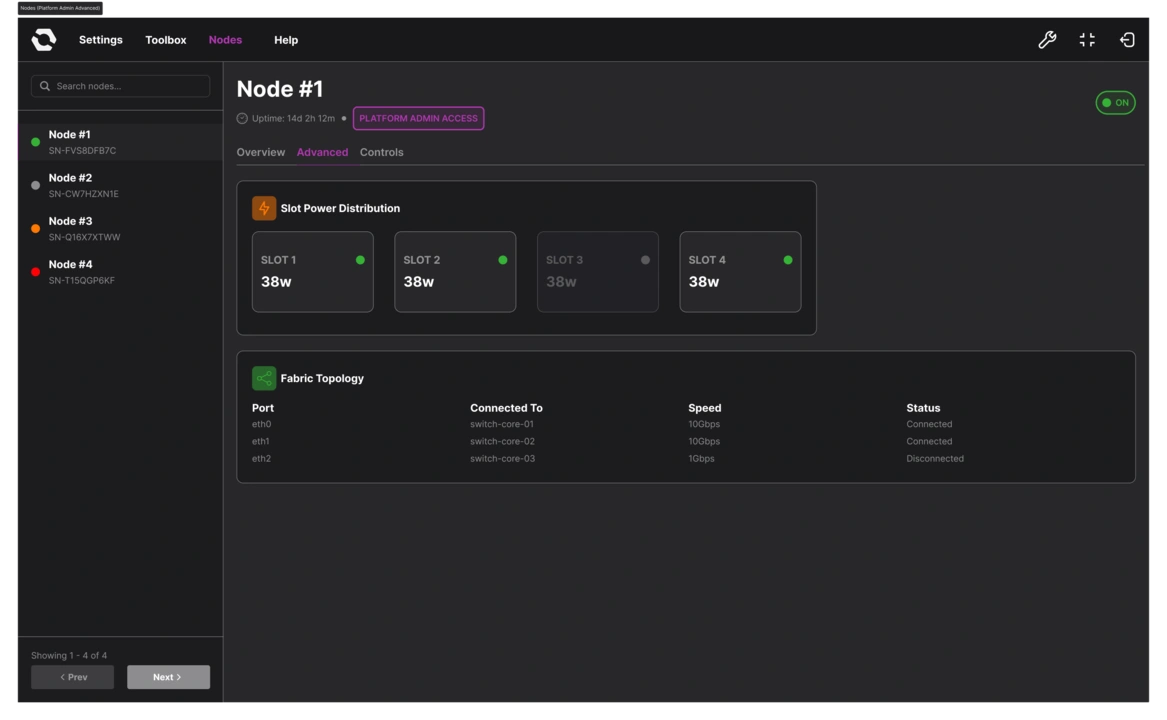
To account for a multi-node system, Ivanne placed a navigation menu that showed all accessible nodes, while settings and functions were spread across different sections and modals.
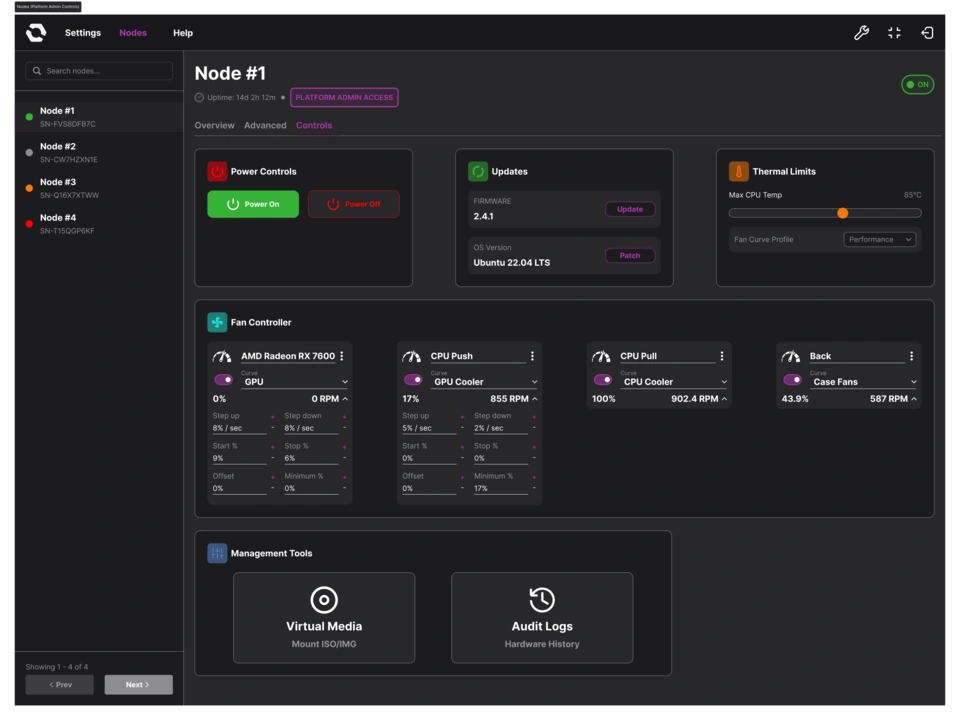
Jon emphasized our unique approach: One active node console at a time. Ivanne and the team went through multiple iterations of the node page, and the UI gradually evolved to lean into the constraint.
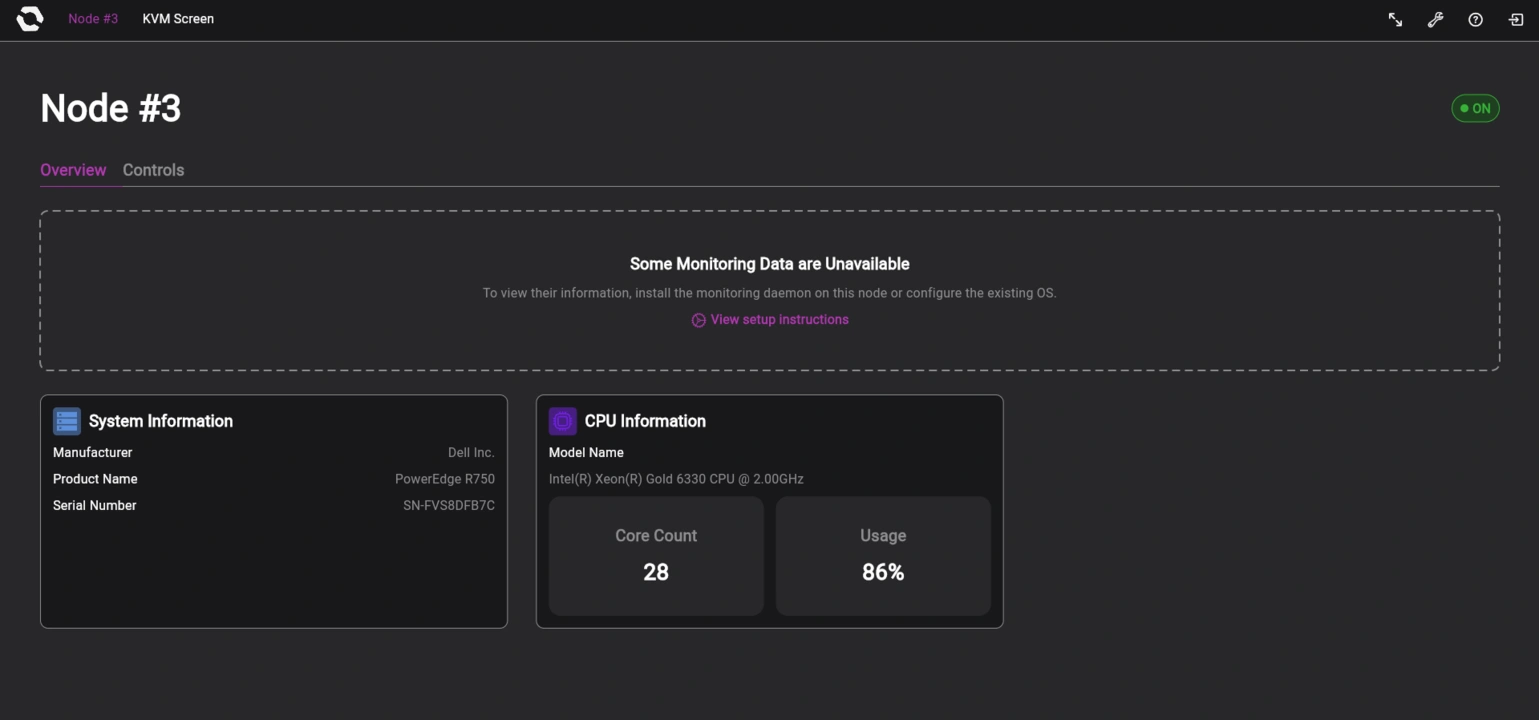
Now, when the user logs in, they’ll be welcomed with a node selection page where they can choose which node to access. Once the user selects a node, a loading screen will appear. Then the user will be on the selected node’s page, where frequently used functions are visible and accessible right away instead of tucked within menus. When the user selects the KVM function, they get taken to a separate KVM page.
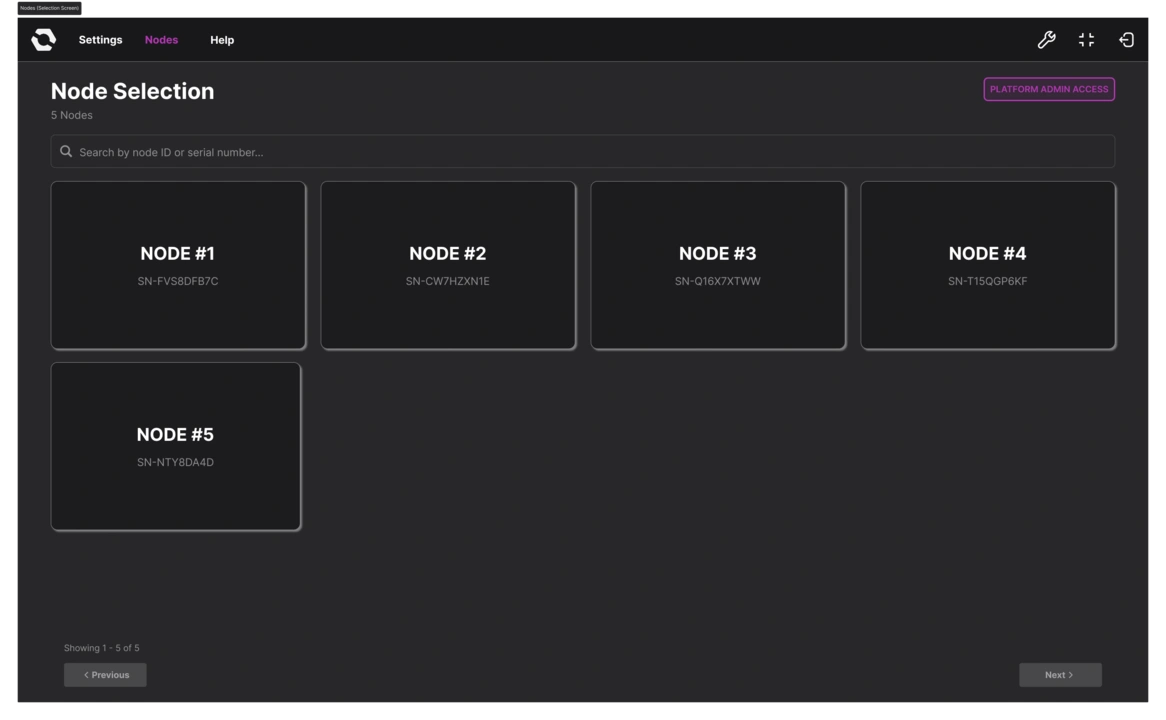
Instead of tabs constantly reminding users that there are other nodes in the system, the OpenSFF logo just serves as a back button that takes users from either the node page or the KVM page back to the node selection page. Ivanne’s also been refining the settings page to account for the all-encompassing platform admin and the limited access of node admins.
Build with OpenSFF
We still have a long way to go and more to share in the coming months. But if there’s one takeaway from everything we’ve read, tested, and created so far, it’s that our standard is truly unique and necessary. Enterprise tools aren’t designed to scale down, and DIY solutions aren’t scalable at all.
We’re excited to test our software on our development hardware and eventually refine our prototypes to a cohesive platform that maximizes the CM5. We hope you’ll join us again on our next update.
We’d also be grateful if you could help spread the word about OpenSFF and our specifications. For technical clarifications and other inquiries, reach out to our development team at [email protected].
Other Articles

Meet OpenSFF: an open hardware standard that enables cross-vendor compatibility, modular systems, and sustainable hardware reuse.
August 11, 2025
We go over the rise of virtualization and the open software adopted by home server enthusiasts, as well as the current challenges and the future of the hobby.
September 06, 2025

Learn why OpenSFF adopted the SFF-TA-1002 connector standard and how it enables our vision.
September 18, 2025