Blog
Behind the Slots: Exploring OpenSFF Enclosure Backplane Configurations
Introduction
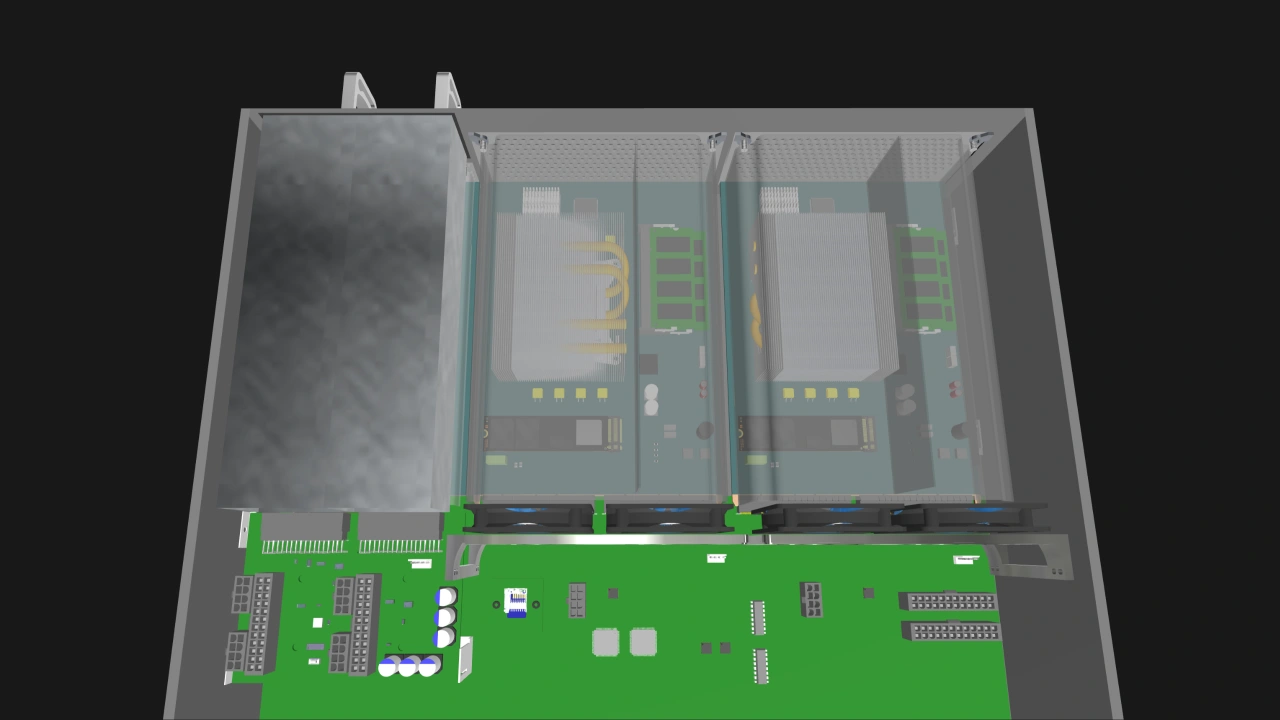
The backplane is literally behind every multi-node server. It is a chassis-mounted circuit board that enables nodes and other modules to connect to each other, receive power, and work as one coherent system. Every OpenSFF-compatible Enclosure will also have a backplane, but what it contains should depend on what the Enclosure is meant to do.
OpenSFF is a nonprofit organization developing an open standard for interoperable, serviceable, and modular small form factor systems. Our hardware specifications define a processing unit called a Compute Node, an optional management unit called a Management Module, and an electronic chassis that can host one or more nodes called an Enclosure. Enclosures have two classes: Core and Enterprise. An Enterprise Enclosure has a set of required infrastructure focused at multi-node computing, such as internal switches and support for the Management Module. A Core Enclosure is anything that does not have all that required infrastructure.
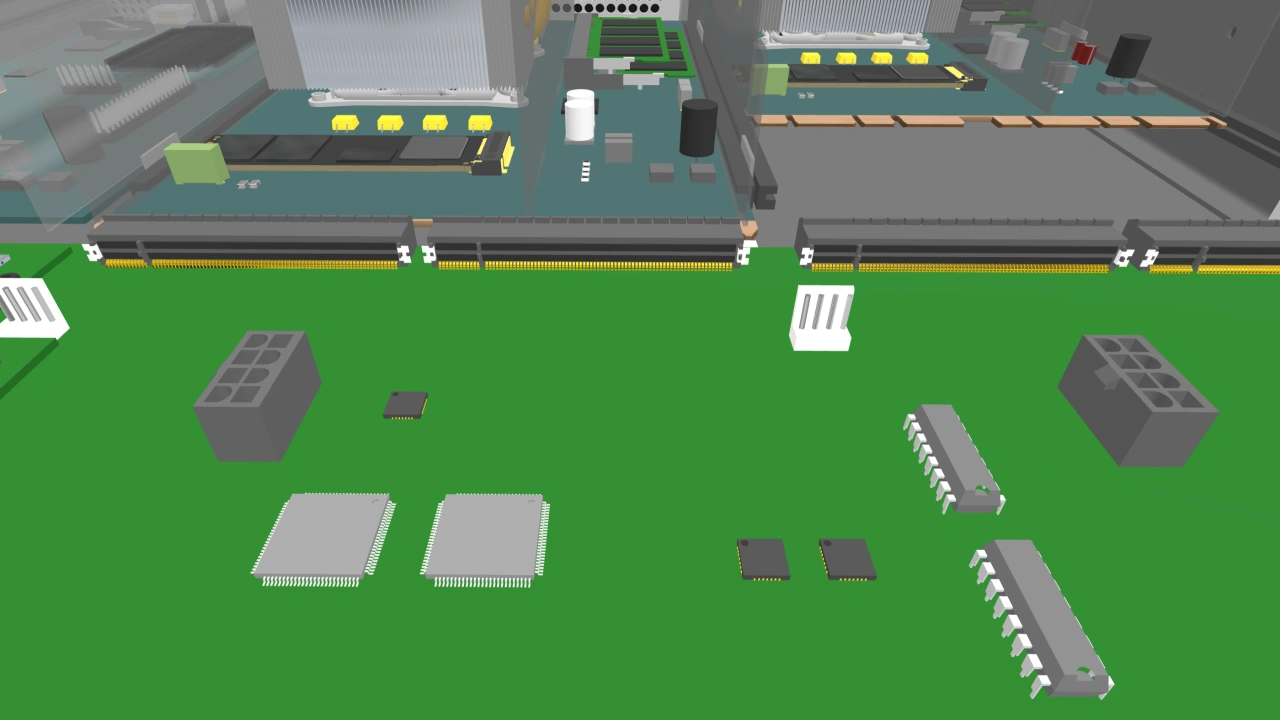
This article will go over the backplane configurations that we believe most vendors are likely to build in an Enterprise Enclosure, a single-slot Core Enclosure, and a multi-node Core Enclosure. Note that the concept renders that follow are for visualization purposes only and present the components we will discuss more as logical blocks than practical configurations. Vendors can implement the Enclosure backplane in numerous ways, and the specification allows them to choose their own components. Further, backplane components do not have to be on one large circuit board. A vendor can split power distribution, switching, and management across several boards that are joined through high-speed links such as mezzanine connectors.
Enterprise Enclosure backplane
An Enterprise Enclosure represents the most complete implementation of the Enclosure Specification. Most of the required Enterprise infrastructure lives on the backplane.
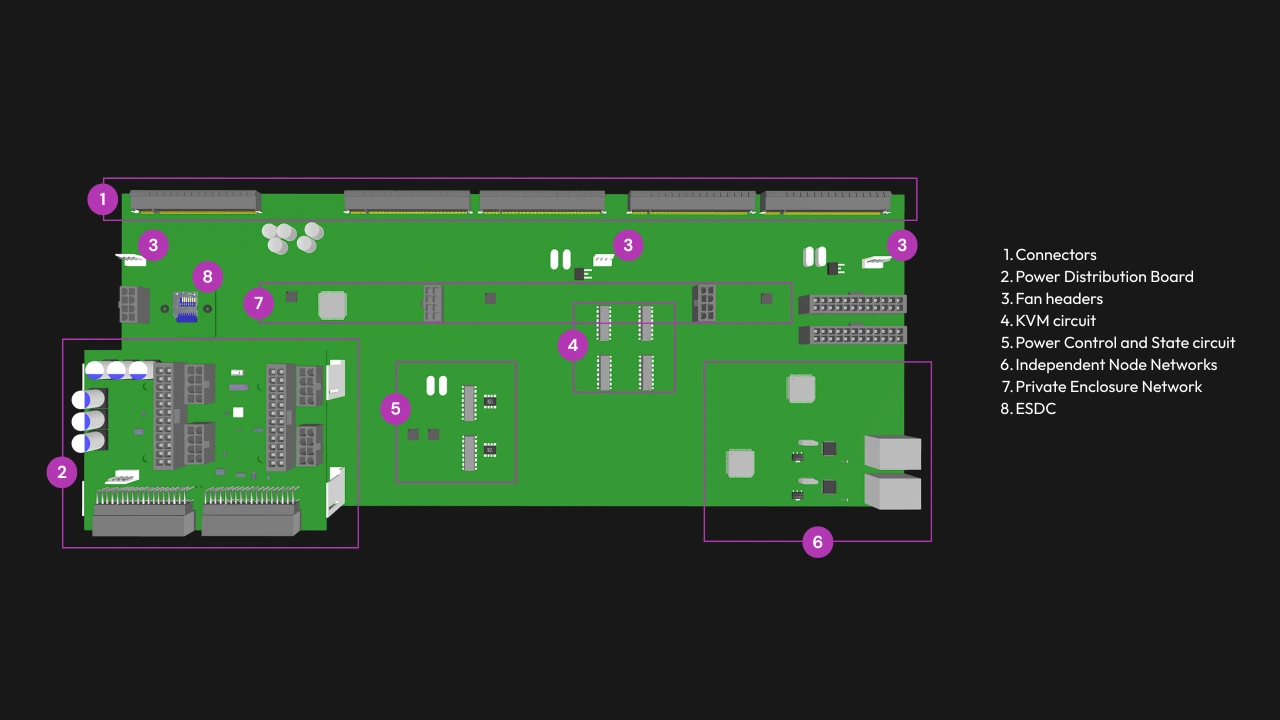
1. Core and Enterprise Connectors in every node slot
Each node slot in an Enterprise Enclosure provides both a Core Connector receptacle and an Enterprise Connector receptacle. As we mentioned, it also has a dedicated Management Module slot with a Management Connector receptacle.
2. Shared power
Power distribution is centralized in Enterprise Enclosures. Every slot receives 12VDC through its connectors—up to 120W for each node slot and up to 50W to the Management Module slot. The Enclosure must have at least two hot-swappable PSU bays and support redundant operation when all bays are populated.
3. Fan headers
Enclosures that use fans for active cooling must provide standard pulse-width modulation (PWM) control and tachometer feedback. The backplane routes each node’s PWM signal to the fan or fan group assigned to its slot, though only one node can control a fan group at any given time. Larger Enclosures may also have fan headers for Enclosure-level fans, to cool Enclosure-bound parts such as hard drives or the backplane itself.
4. KVM signal routing
The backplane provides one DisplayPort signal path and one USB 2.0 signal path from each node slot to the Management Module, as well as circuitry that enables selection of the active node slot.
5. Node power control and state monitoring
An Enterprise Enclosure must also have circuitry that allows the Management Module to control the power of each node and identify if an installed node is drawing power. Because this is separate from the KVM routing, one node can be selected for KVM access while a different node is given a power command.
6. Two Node Network switches
The Node Network (NN) carries workload and clustering traffic. An Enterprise Enclosure must have two independent NN switches, each with its own external uplink or uplinks for redundancy.
7. One Private Enclosure Network switch
The Private Enclosure Network (PEN) switch is connected to one USB-to-Ethernet bridge per node slot, which in turn connects to a USB 3.0 signal from each node. The PEN is independent of the NN and can be accessed only through the Management Module’s Ethernet port.
8. One Enclosure microSD Card slot
The Enclosure microSD Card (ESDC) holds Enclosure metadata and Management Module configuration backups. It connects to the Management Connector via a dedicated USB 2.0 connection.
Single-slot Core Enclosure backplane
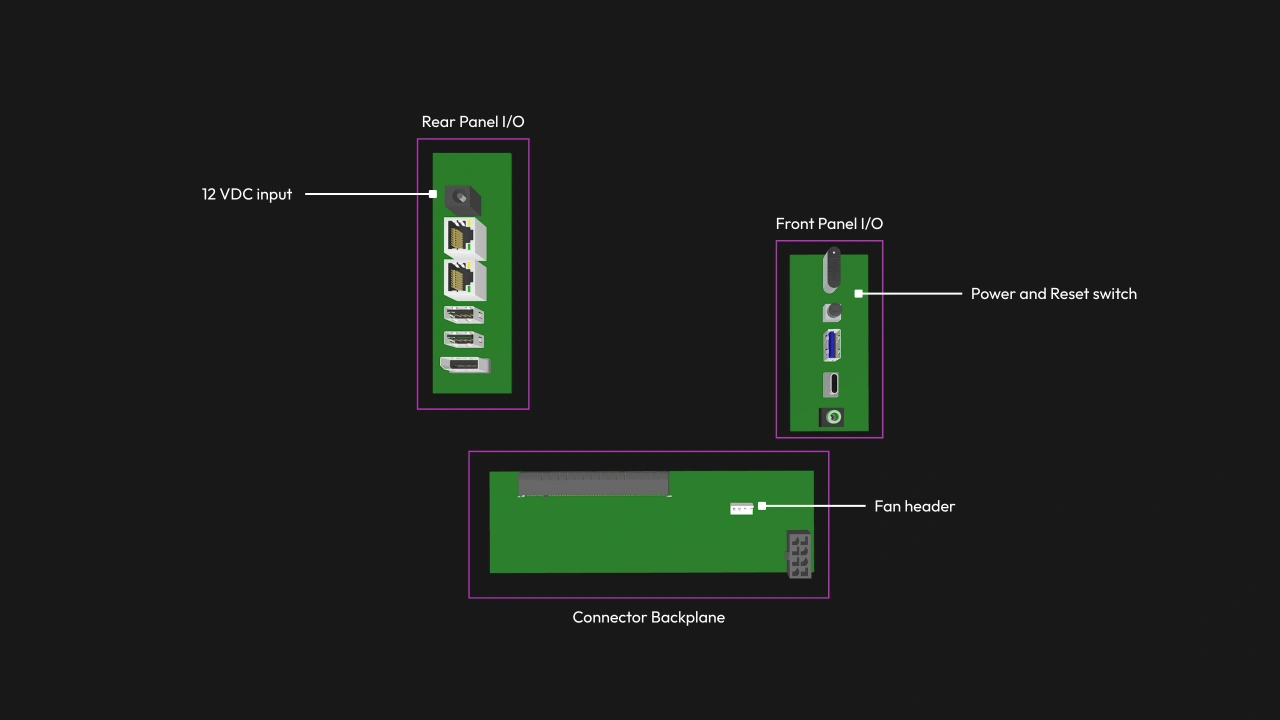
The simplest Core Enclosure will be a mini PC or an appliance built around one Compute Node. Its backplane can be as simple as a small board with wiring assemblies to connect the Enclosure’s node slot to external power and any I/O ports. This Enclosure would not need internal switches or KVM signal routing.
Power delivery can be as simple as an external AC adapter that terminates in a DC barrel jack, or perhaps a 240W USB-C PD input. The backplane may expose the node’s Ethernet, USB, and DisplayPort signals directly, but the Enclosure can also consume some or all of these signals internally, such as through a USB radio dongle or a Wi-Fi interface. Unused interfaces can also be left unconnected.
Multi-slot Core Enclosure backplane
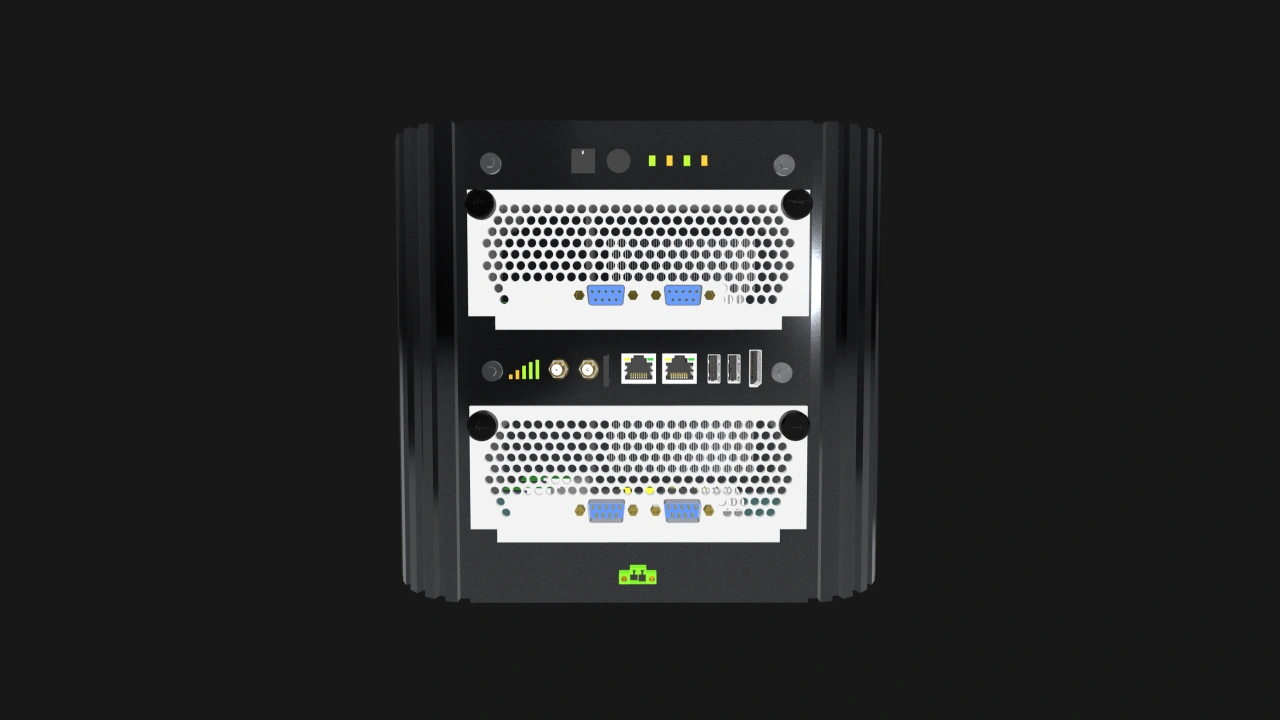
Core Enclosures can also have multiple node slots and implement some of the features that are required in Enterprise Enclosures. For example, it may have shared power delivery and cooling but not an NN switch. It may have the management infrastructure while also exposing each node’s Ethernet signal individually, allowing users to connect those ports to an external switch.
OpenSFF Enclosure backplane design considerations
Design for the required signals
Regardless of a vendor’s design, they must take particular care of the 4C+ connector receptacle or receptacles on the backplane and nearby areas. Our specifications define pinouts that allow each connector to carry Ethernet, USB, DisplayPort, and PCIe signals. Therefore, the backplane in an OpenSFF-compatible Enclosure must be designed with those signals in mind, including their respective required signaling rates.
Maintain signal integrity
Vias, stubs, and other board layout techniques that save space or increase trace density can degrade signal quality. Vendors must therefore avoid using such paths near connector receptacles.
4C+ connectors are not interchangeable
The Core, Enterprise, and Management Connectors share the 4C+ physical connector, but they have different pin assignments. For example, some of the pins that carry power on the Core Connector are reserved pins on the Enterprise Connector.
Build with OpenSFF
As with most of the Enclosure Specification, vendors have plenty of flexibility when it comes to designing and implementing the Enclosure backplane. We provide guidance only when it is absolutely necessary, as is the case with the 4C+ connectors. Our standard makes it easier for vendors to differentiate, innovate, and take advantage of future technologies while maintaining interoperability.
We encourage you to read our specifications, and we would be grateful if you help spread the word about OpenSFF. For technical clarifications, partnerships, and other inquiries, reach out to our development team at [email protected].
Other Articles

Meet OpenSFF: an open hardware standard that enables cross-vendor compatibility, modular systems, and sustainable hardware reuse.
August 11, 2025
We go over the rise of virtualization and the open software adopted by home server enthusiasts, as well as the current challenges and the future of the hobby.
September 06, 2025

Learn why OpenSFF adopted the SFF-TA-1002 connector standard and how it enables our vision.
September 18, 2025